

Why Developers Choose the OPC AE Server Toolkit
- Powerful Windows API for building OPC Alarms and Events (A&E) servers
- Fully supports the OPC A&E 1.10 standard specification
- Abstracts COM, DCOM, and OPC protocol complexities
- Lets developers focus on core alarm logic instead of infrastructure
- Significantly reduces development time
- Accelerates time-to-market for industrial automation software
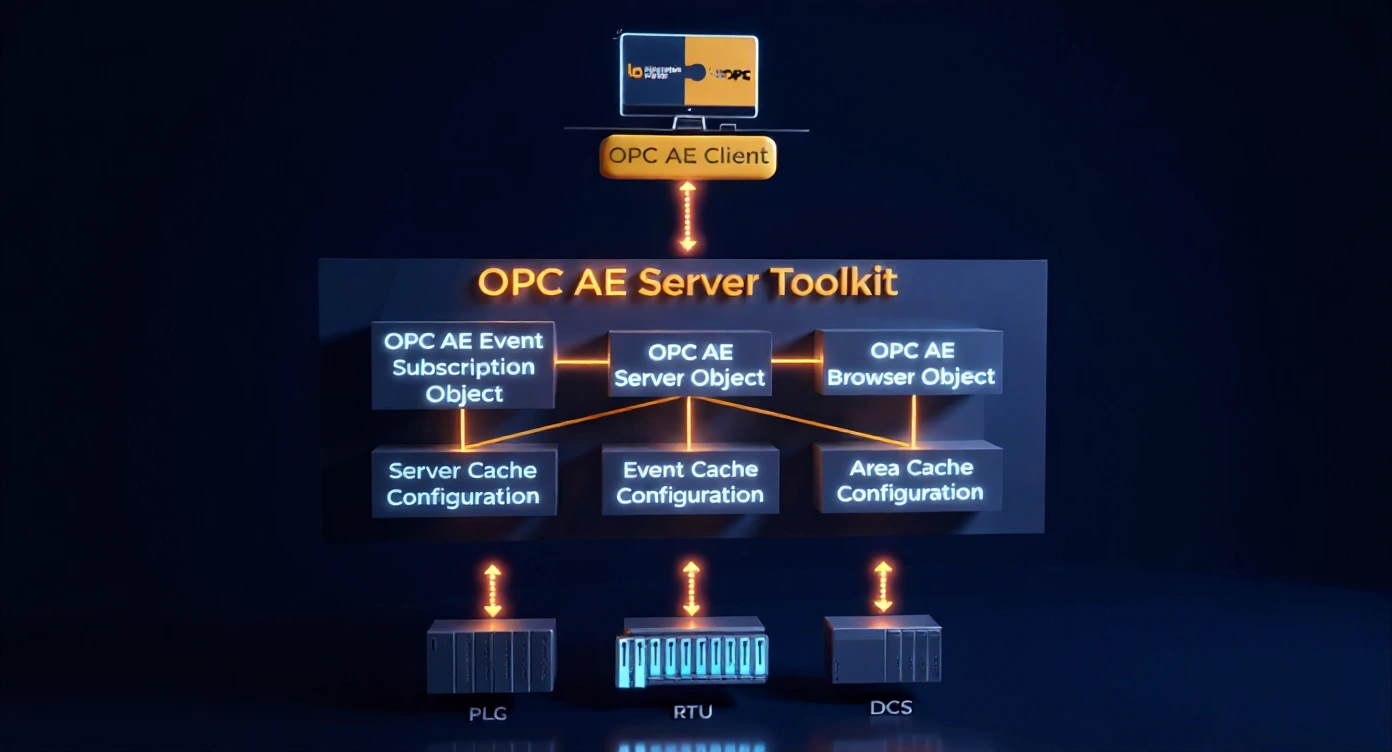
OPC Alarms and Events (OPC AE) is an industry-standard specification for exchanging alarm and event information between industrial systems. An OPC AE Server collects, manages, and distributes alarm and event notifications from process equipment, PLCs, DCS systems, or other data sources to client applications like SCADA, HMI, or alarm management systems. If you need to integrate alarm data from proprietary or legacy systems into standard OPC-compliant platforms, developing a custom OPC AE Server is the most efficient way.
Development time varies based ony our data source and communications complexity, but the OPC AE Server Toolkit can reduce development time by 60-80% compared to building from scratch. A simple OPC AE Server can be operational in 2-5 days, while complex implementations with custom business logic typically require 2-4 weeks. The toolkit eliminates weeks of low-level COM/DCOM protocol work, allowing you to focus on your application's unique requirements.
No. The OPC AE Server Toolkit abstracts away the complexities of COM/DCOM programming. The toolkit handles all protocol-level details, client session management, and inter-process communication automatically. Developers need to understand basic OPC concepts only and can focus on implementing alarm logic and data source integration using familiar programming languages like C++ or C#.
Yes. The toolkit supports both local (same machine) and remote (network) OPC AE client connections via DCOM. For environments where DCOM configuration is challenging or security policies restrict DCOM, Integration Objects also offers OPCNet Broker®, which provides secure OPC tunneling over a single TCP port, eliminating DCOM configuration complexities and security vulnerabilities.
The OPC AE Server Toolkit uses a per-developer perpetual license model. Once purchased, developers can create unlimited OPC AE Server applications without runtime royalties. This makes it cost-effective for commercial product development. Trial versions are available for evaluation before purchase.
Yes. There are no runtime royalties or redistribution fees for servers developed using the OPC AE Server Toolkit. You can deploy your custom OPC AE Servers to unlimited machines, whether for internal use or as part of commercial products you sell to customers, without additional per-deployment costs.
OPC AE Server Toolkit Resources
Product Datasheet
Comprehensive technical specifications and features overview
User Guide
Step-by-step installation and configuration guide