0%
Skip to content
OPC Data Archiving

Centralizing Multi-Site Wind Farm OPC Data in One Azure SQL Database

A renewable energy operator archived OPC DA data from every remote wind farm into a single Azure SQL Database, giving its asset team live values and full history for the whole fleet without custom integration code.

Architecture
One archiver per site, one cloud database
Scale
About 10,000 tags, multiple sites

Overview

A renewable energy operator runs wind farms at several remote locations, with turbines supplied by different OEMs (Original Equipment Manufacturers). Each site exposes its turbine data through a local OPC DA server. The operator's asset management team wanted every site's temperatures, pressures, positions, states, set points and events in one place, with both the latest values and the history behind them.

They achieved it with one OPC Easy Archiver per site, each writing to a single central Azure SQL Database that feeds the team's asset monitoring dashboards in Azure.

The Challenge

The fleet had grown site by site. Every wind farm had its own OPC DA server, and each was tied to a different turbine supplier. Data stayed at the site where it was produced, so the asset team had no single view of fleet performance.

The obvious fixes were costly. Writing a custom integration for every site meant code to build, test and maintain for each OEM. Reading OPC DA data remotely from a central location would rely on DCOM (Distributed Component Object Model), which is hard to configure and fragile across firewalls and WAN links. And remote sites sit on links that drop, so any central copy risked gaps in its history.

The operator set five requirements:

  1. One central database for all sites, holding live values and historical records.
  2. The same approach at every site, whichever OEM built the turbines.
  3. Configuration through a graphical tool, not custom code, so new sites can be added quickly.
  4. No data loss when a site's link to the cloud goes down.
  5. Automatic recovery after an outage, without manual user intervention on site.

The Solution

The operator installed OPC Easy Archiver at each wind farm, on the same network as that site's OPC DA server, and pointed every instance at one central Azure SQL Database.

The architecture

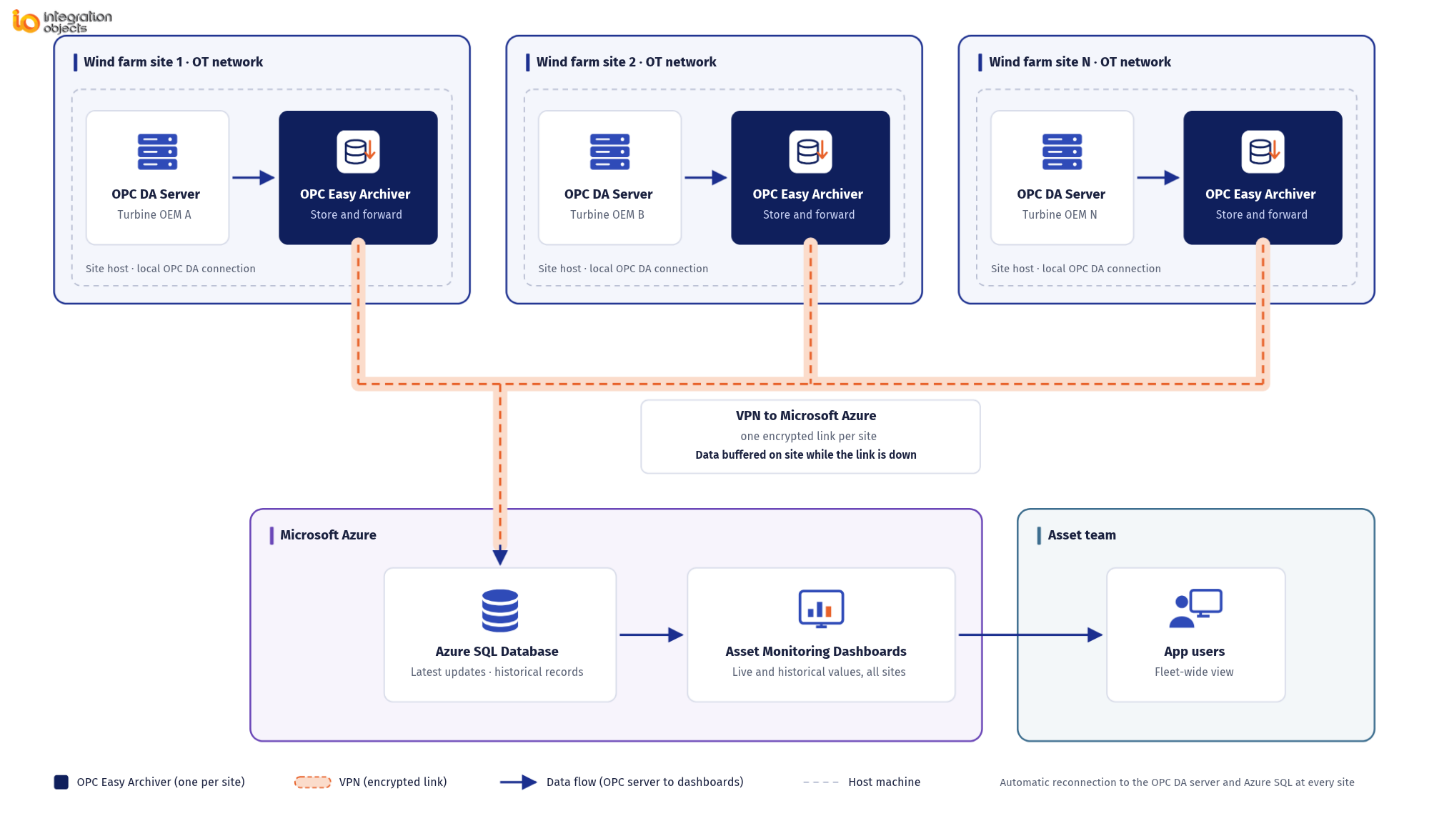
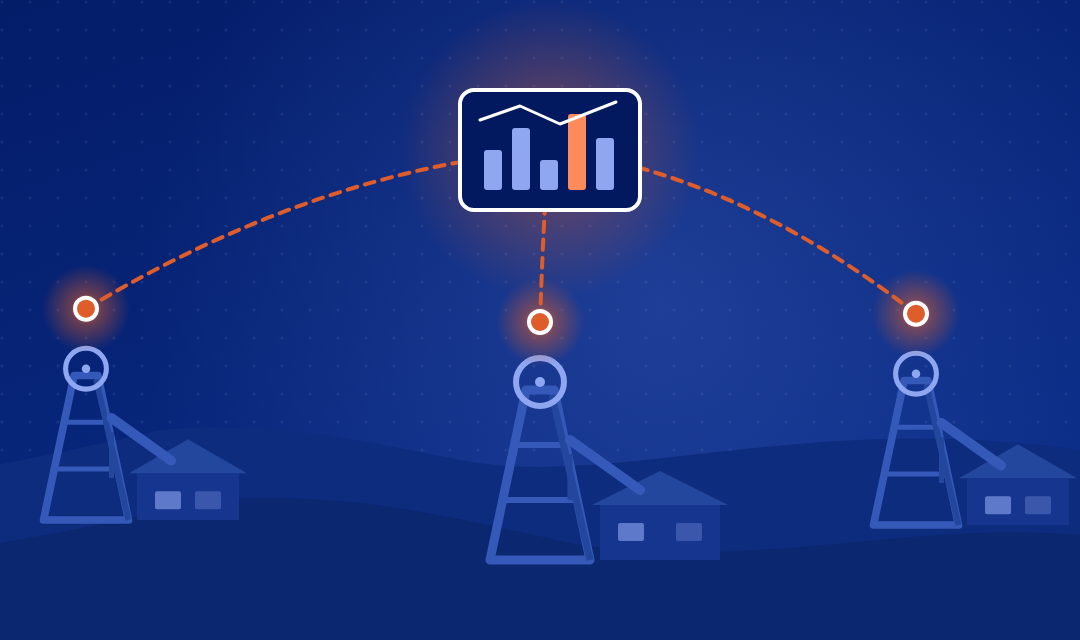
Figure 1: One OPC Easy Archiver per wind farm site sends OPC DA data over a VPN to one Azure SQL Database that feeds asset monitoring dashboards

Figure 1: One OPC Easy Archiver per wind farm site sends OPC DA data over a VPN to one Azure SQL Database that feeds asset monitoring dashboards

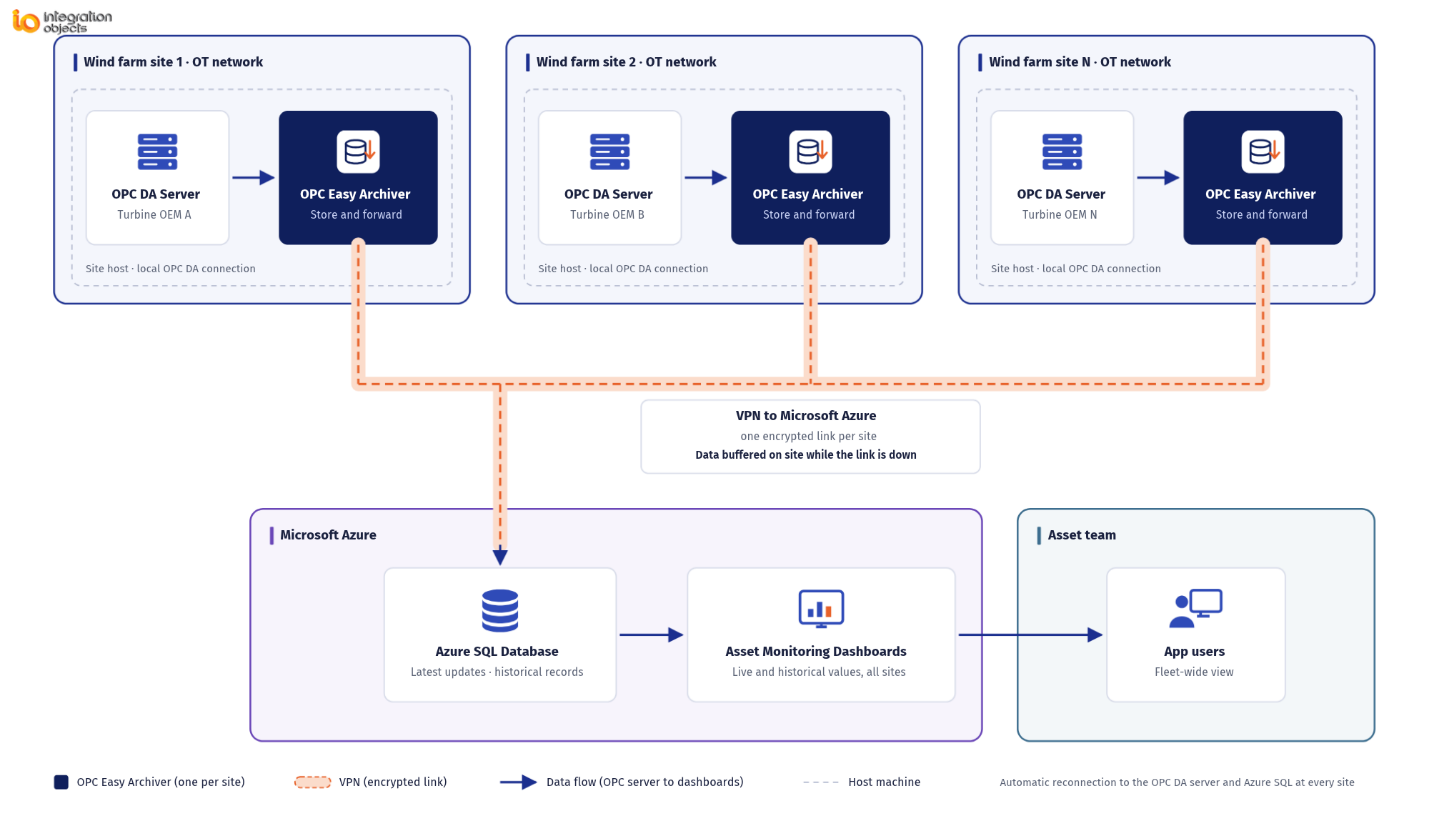
Each site's OPC DA server feeds its own OPC Easy Archiver; every archiver writes over the VPN into the one database the dashboards read.

Local OPC connection at each site

Each OPC Easy Archiver reads from the OPC DA server next to it, so no OPC DA communication crosses the WAN.

One database for the fleet

All instances write to the same Azure SQL Database over a VPN, which stores both the latest updates and the historical records.

Dashboards on one source

The asset monitoring dashboards in Azure query that central database, so app users see every site's live values and history in one place.

Configured per site, not coded

Update rates, read modes and OPC tags are set for each site in OPC Easy Archiver's graphical configuration tool.

Resilient on remote links

Store and forward capability of the OPC Easy Archiver buffers data locally when a site loses its connection to Azure and sends it once the link is back. Automatic reconnection restores the links to both the OPC DA server and Azure SQL.

Typical Deployment

A typical deployment follows the same pattern at every site:

  1. Install OPC Easy Archiver on a machine at the site, alongside the existing OPC DA server.

  2. Browse the OPC DA server and select the tags to archive: temperatures, pressures, positions, states, set points and events.

  3. Set the update rate and read mode for that site in the graphical configuration tool.

  4. Point the instance at the shared Azure SQL Database through the site's VPN connection.

  5. Enable store and forward, so data is buffered locally during any link outage.

  6. Repeat for the next site. The database and dashboards need no change as sites are added.

Key Benefits

One fleet-wide view

About 10,000 tags from every site in one Azure SQL Database, so dashboards query one source instead of several.

OEM-independent

Every site's OPC DA server is handled the same way, whoever built the turbines.

No custom code

Sites are configured in a graphical tool, which keeps the deployment easy to maintain as the fleet grows.

No gaps in history

Store and forward keeps the fleet record complete through remote-link outages.

Hands-off recovery

Automatic reconnection to the OPC servers and Azure SQL means nobody restarts anything on site.

Lower integration cost

One product and one database replace a custom integration per site.

Cyber Security Considerations

OPC DA stays local

OPC Easy Archiver connects to the OPC DA server on the site network, so DCOM is never exposed beyond the site. Only required OPC data is collected.

Encrypted path to the cloud

Each site reaches Azure SQL Database through a VPN, not over an open internet connection.

Write-only role for archiving

Each OPC Easy Archiver instance can use a dedicated Azure SQL login with write access limited to its own tables, while dashboard users get read-only access.

No inbound access to the turbines

Dashboard users query the cloud database, never the site OPC servers or control networks.

The architecture

Bring every site into one database

Talk to our team about archiving OPC data from multiple sites into Azure SQL.

More use cases

All use cases
OPC Tunneling
OPCNet Broker® DA HDA AE

Consolidating OPC data from multiple sites into a central historian

How OPCNet Broker® secures the OPC links between the OPC servers at each plant and a local data collection application, which forwards the data to a central historian or database, with encryption, authentication and tag-level access control.