Supervisory Control and Data Acquisition (SCADA) and Human Machine Interface (HMI) show up in the same sentence so often that many users use the terms interchangeably. They shouldn’t be. An HMI is the screen through which operators visualize and interact with a process, while SCADA is a broader supervisory system that acquires, aggregates, monitors, stores, and manages process data across multiple assets or locations.
Understanding where one ends and the other begins matters when you’re specifying a new system, troubleshooting a slow-to-update display, or evaluating a modern platform that bundles both.
SCADA vs HMI in One Sentence
SCADA is the entire system that gathers, processes, stores, and acts on data across a production unit, a plant or network of sites, while an HMI is the visual layer within that system that lets an operator see and interact with the process. Most SCADA systems include an HMI, but the underlying SCADA functions don’t strictly require one, and not every HMI is part of a SCADA system.”
What Is an HMI?
An HMI is the graphical interface that translates raw industrial data into something an operator can read and act on: trends, mimic diagrams, alarm banners, and control buttons. It can be as small as a touchscreen mounted on a single machine, or as sophisticated as a multi-screen operator interface used in a control room.
Referring to the Purdue Model, HMIs typically operate at Level 1–2 of the automation pyramid.
When deployed in Level 1, HMIs connect directly to one PLC, one line, or one skid. Their scope is local by design:
- Displaying live values and set points for a specific process
- Issuing manual commands (start/stop, open/close, set point changes)
- Showing local alarms and basic trend history
- Running independently of any wider supervisory network, if needed
When deployed in Level 2, HMIs would be operator workstations part of a SCADA system.
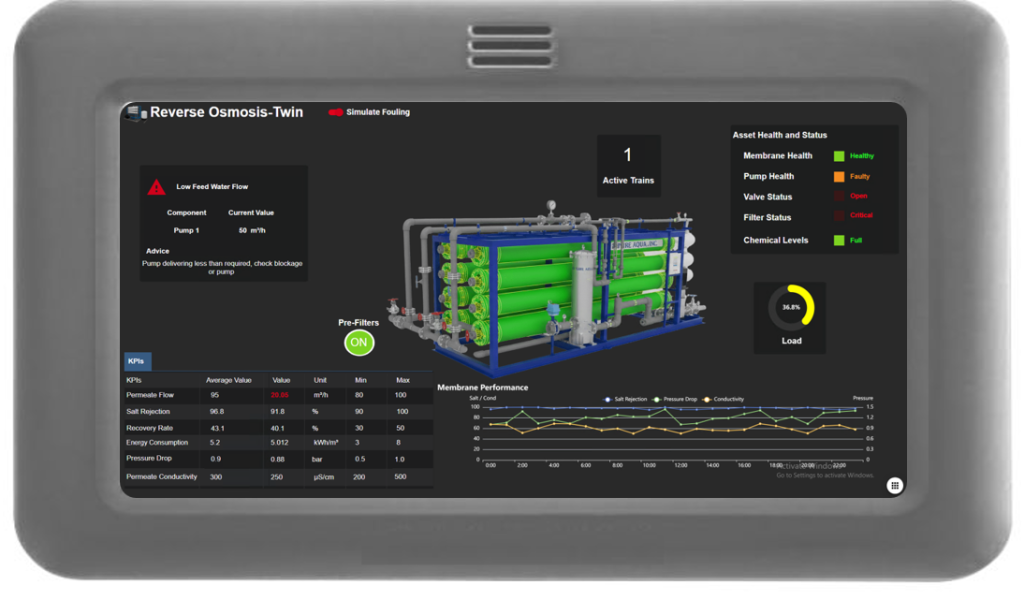
Figure 1: HMI Example
What Is SCADA?
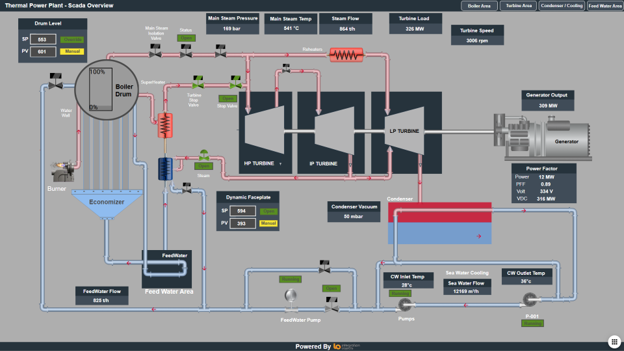
SCADA is a supervisory system that typically operates above field controllers such as PLCs and RTUs, while providing centralized visualization, data acquisition, alarming, historical data, and supervisory control. Local HMIs may operate alongside it at the machine or process level.
Where an HMI answers “what is this machine doing right now,” SCADA answers “how is the whole plant, or the whole process, performing.”
A SCADA system typically includes:
- One or more HMIs as its presentation layer, also referred to as operator screens or workstations.
- A data acquisition layer polling PLCs, RTUs, and OPC servers
- Historian or database storage for trend and compliance data
- Centralized alarm management and event logging
Communication infrastructure linking remote sites back to a control centerA SCADA system relies on the network/communication infrastructure, radios, cellular, leased lines, or fiber, linking distributed equipment, lines, or sites back to a control center.
CTA: See our guide What is SCADA
Key Differences: SCADA vs HMI
The table below summarizes how the 2 compare across the dimensions engineers care about most when specifying a system.
| Aspect | HMI | SCADA |
| Scope | Single machine, skid, or line | Multi-line, plant-wide, or multi-site |
| Purdue Model level | Level 1–2 | Level 2–3 |
| Primary function | Local visualization and operator control | Supervisory monitoring, data acquisition, alarming, and centralized control |
| Data storage | Minimal or none | Typically supports historical data and/or historian/database integration |
| Can run standalone? | Yes | Yes, but provides or integrates with an operator interface |
| Typical protocols | Direct PLC drivers, OPC DA/UA | OPC UA, MQTT, Modbus, DNP3, IEC 60870-5-104 |
How SCADA and HMI Work Together
In practice, the 2 are not competing choices, they are layered. A typical architecture looks like this:
- Field devices (sensors, actuators, PLCs, RTUs) generate raw process data
- Local HMIs give operators a real-time view and manual control at the machine or line level
- A SCADA data acquisition layer polls data from those same devices, often via OPC UA, OPC DA, or Modbus, and consolidates the data
- The SCADA historian stores that data for trending, compliance reporting, and analytics
- A supervisory HMI, running on top of SCADA, gives control-room operators the multi-line, plant-wide or multi-site view
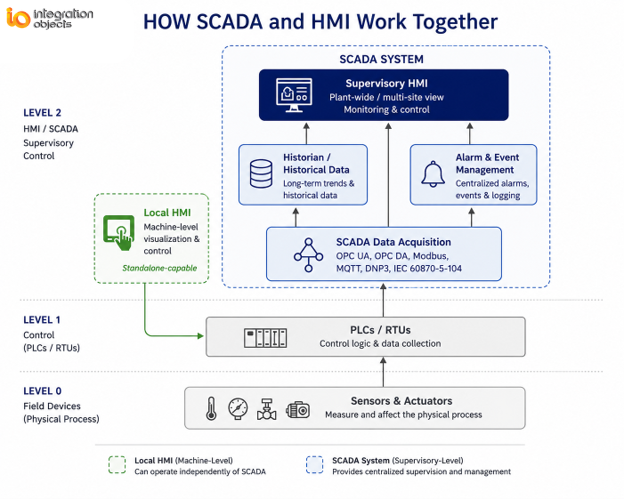
A machine-level HMI is standalone; a supervisory HMI is one component of a much larger SCADA system with data acquisition, historian, and alarm management working underneath it.
Common Misconceptions
- “SCADA and HMI are the same product.” Not exactly. An HMI is an operator interface, while SCADA is a broader supervisory system that may include one or more HMIs.
- “You need SCADA to have an HMI.” False. A single-machine HMI can run with no supervisory system at all.
- “HMI is just a screen.” Modern HMIs increasingly include local logic, alarm handling, and short-term trending, not just static graphics.
- “Bigger SCADA always means better visibility.” Scope should match the operation. A single-site plant gains little from architecture built for multi-site supervision, and often just adds cost and complexity..
HMI and SCADA are different concepts, but they don’t necessarily need to be separate products. A modern platform can provide both the local operator interface and the supervisory capabilities within a unified environment.
Where SIOTH® Unified HMI Changes the Picture
In some traditional or fragmented deployments, machine-level HMI software and supervisory SCADA software are provided as separate environments, each with its own configuration tools, licensing model, and integration capabilities.
SIOTH® takes a different approach with its Unified HMI (UHMI) module: a single web-based visualization layer used to build both local operator screens and plant-wide SCADA dashboards, on top of OPC UA-native data acquisition and support for protocols including OPC DA, Modbus, PROFINET, MQTT, and DNP3. The practical effect is one design environment instead of two, and one set of screens that can scale from a single line view to a multi-site operations picture.
Want to see what a single unified interface looks like across both levels?
Explore SIOTH® SCADA
Frequently Asked Questions
Can you have SCADA without HMI?
A traditional SCADA deployment includes at least one operator interface, but the SCADA functions themselves do not inherently require a conventional HMI. Data acquisition, processing, alarming, historian, and supervisory functions can be exposed through other interfaces such as web applications, dashboards, or APIs.
Which is more expensive, SCADA or HMI?
A standalone machine-level HMI is typically far less expensive than a full SCADA deployment, since SCADA adds data acquisition , historian storage, redundancy, and often multi-site monitoring capabilities.
Do small plants need SCADA, or is HMI enough?
A single machine often only needs an HMI. SCADA becomes necessary once you need to supervise multiple machines, lines, or sites from a central point, or need long-term historical data and centralized alarm management.