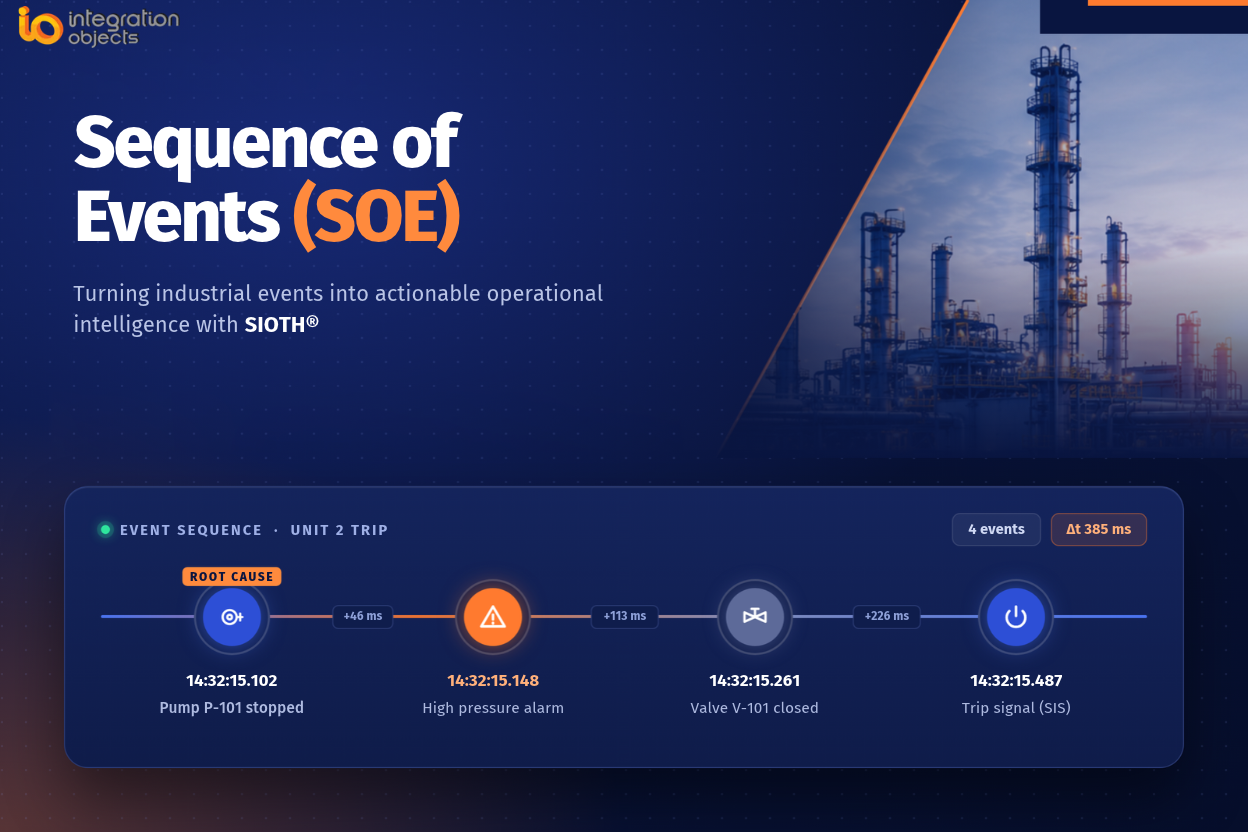
Quick definition: A Sequence of Events (SOE) application collects, timestamps, and chronologically orders the alarms, state changes, and operator actions generated by industrial control, safety, and electrical systems, so engineers can reconstruct exactly what happened and in what order, during a trip, shutdown, or process upset. When it spans multiple systems such as PLCs, DCS, SCADA, and SIS, it is called a cross-system SOE.
When an Incident Happens, Sequence Matters
In industrial environments, the difference between understanding an incident and simply knowing that something went wrong often comes down to the accuracy and context of the event timeline.
When a trip, shutdown, process deviation, or equipment failure occurs, operators and engineers need more than a list of alarms. They need to reconstruct what happened before, during, and after the incident: Which event occurred first? Which condition triggered the next one? How did the process respond? Which alarms were consequences rather than causes? And what ultimately led to the shutdown or the abnormal condition?
This is the role of a Sequence of Events (SOE) application.
By collecting, time-stamping, storing, and presenting industrial events in chronological order, an SOE system provides a detailed timeline for operational troubleshooting, incident investigation, and audit. When integrated into a broader industrial data platform such as SIOTH®, SOE information can become part of a unified operational intelligence environment rather than remaining isolated in individual control systems.
What Is a Sequence of Events (SOE) Application?
A Sequence of Events application captures significant events generated by industrial control, automation, electrical, and safety systems and records them with accurate timestamps. Its purpose is not simply to store more events, but to preserve their chronological relationship so engineers can reconstruct an incident.
Typical events may include:
- Equipment start and stop events
- Circuit breaker and switchgear operations
- Valve status changes
- Interlocks
- Trips and shutdowns
- Process alarms
- Operator actions
- Protective system activations
- PLC, DCS, or SCADA state changes
- Equipment fault conditions
Events can then be stored in a historical repository and made available for search, filtering, visualization, correlation, and analysis.
The objective is simple: reconstruct what happened, and in what order, during an industrial incident and afterwards for investigation and audit.
Why Event Timestamping Matters
SOE analysis is only as reliable as the timestamps associated with the events. In fast-moving incidents, events may occur very close together. If each source system maintains an independent clock, differences in clock accuracy or synchronization can make events appear in the wrong order.
For high-resolution event analysis, source timestamps are preferable whenever the originating PLC, DCS, protection relay, or other device provides them. A reception timestamp assigned by the SOE platform records when the event reached the platform, but it can be affected by communication and network delays.
Time synchronization across contributing systems, by using the appropriate site time-synchronization architecture, such as NTP or PTP where applicable, is therefore an important prerequisite for trustworthy cross-system sequence reconstruction.
Why SOE Matters in Industrial Operations
Traditional alarm screens are primarily designed to help operators respond to current conditions.
Consider a process shutdown where an operator sees dozens of alarms appearing within a few seconds. Without accurate event timestamps and a common timeline, it may be difficult to determine whether a high-pressure condition caused the shutdown, a valve failed to respond, an interlock activated first, an operator command occurred before or after the process deviation, or a downstream equipment failure propagated back into the process.
An SOE application provides the chronological evidence needed to distinguish an initiating event from the consequential alarms and state changes that follow.
SOE can help teams:
- Reduce troubleshooting time: Engineers can reconstruct the timeline of an incident instead of manually comparing multiple alarm and event logs.
- Support root-cause analysis: The initiating event can be distinguished from the large number of consequential alarms generated by the incident.
- Improve incident investigation: Historical event records provide a consistent basis for analyzing trips, shutdowns, and abnormal operating conditions.
- Improve equipment reliability: Recurring event sequences can reveal equipment or control problems that may otherwise remain hidden.
- Support operational decision-making: Historical event patterns can be analyzed to identify recurring operating conditions and opportunities for improvement.
From Alarm History to Event Intelligence
An SOE application should not be reduced to a conventional alarm historian. The distinction is the focus on accurate chronological reconstruction, event ordering, and correlation across contributing systems.
A conventional alarm history commonly answers questions such as:
- When did the alarm occur?
- When was it acknowledged?
- When did it return to normal?
An SOE investigation adds questions such as: What happened first? Which event initiated the sequence? Which events were consequences? How did different systems respond, and how did the process evolve?
| Timestamp | Event |
| 14:32:15.102 | Pump P-101 stopped |
| 14:32:15.148 | Flow FIC-101 low |
| 14:32:15.211 | Low-flow alarm activated |
| 14:32:15.325 | Interlock activated |
| 14:32:15.402 | Feed valve closed |
| 14:32:16.015 | Reactor shutdown initiated |
The sequence immediately provides more context than viewing each alarm independently. In this example, the pump stop precedes the low-flow alarm, so the low-flow alarm is more likely to be a consequence of the pump event than its initiating cause.
The Challenge: Industrial Events Are Distributed Across Multiple Systems
Modern industrial facilities rarely operate with a single control system. A typical environment may contain PLCs, DCS platforms, SCADA systems, Safety Instrumented Systems (SIS), electrical control systems, protection relays, switchgear, RTUs, historians, alarm-management systems, and specialized equipment-monitoring systems.
Each system can generate its own alarms, events, states, and operator actions. An engineer may therefore need to access several systems, export historical data, reconcile timestamps and formats, and manually reconstruct the sequence.
The problem becomes more complex when systems use different:
- Data formats
- Communication protocols
- Timestamp resolutions
- Clock synchronization
- Time zones
- Event classifications
- Historical storage mechanisms
A centralized SOE capability can provide a common layer for collecting and analyzing this information while preserving the source context needed for investigation.
Isn’t SOE Already Built Into My SCADA?
Many SCADA and control platforms already include some form of sequence-of-events capability, an alarm banner, or a historical alarm table tied to that specific system. For a single-system environment, this built-in capability may be sufficient.
The limitation appears when an incident crosses system boundaries. A platform-native SOE view is generally scoped to the system in which it operates. It can reconstruct events within that system, but it is not necessarily designed to reconstruct a sequence spanning PLCs, DCS, SCADA, SIS, electrical systems, and specialized monitoring platforms.
Consider a shutdown where:
- The initiating condition is detected by a PLC
- Interlock logic executes in a DCS
- The safety response is recorded by an SIS
- A motor or breaker protection device records a trip
- The operator action is logged in a separate SCADA client
Each system may have its own internal SOE or alarm history. None of them, on its own, necessarily answers the cross-system question engineers need to answer: what happened first across the process?
A dedicated cross-system SOE layer removes much of this manual reconciliation. Instead of treating SOE as a feature confined to one platform, a centralized layer can collect events from contributing systems, represent them in a consistent time format, retain source information, and present them as a common chronological timeline.
For single-vendor, single-platform environments, a built-in SOE view may be all that is needed. Where multiple systems contribute to the same incident, a cross-system SOE layer turns fragmented, per-system histories into one investigable timeline.
What Is SCADA? A Beginner’s Guide to Supervisory Control and Data Acquisition
SIOTH®: A Unified Platform for Industrial Event Management
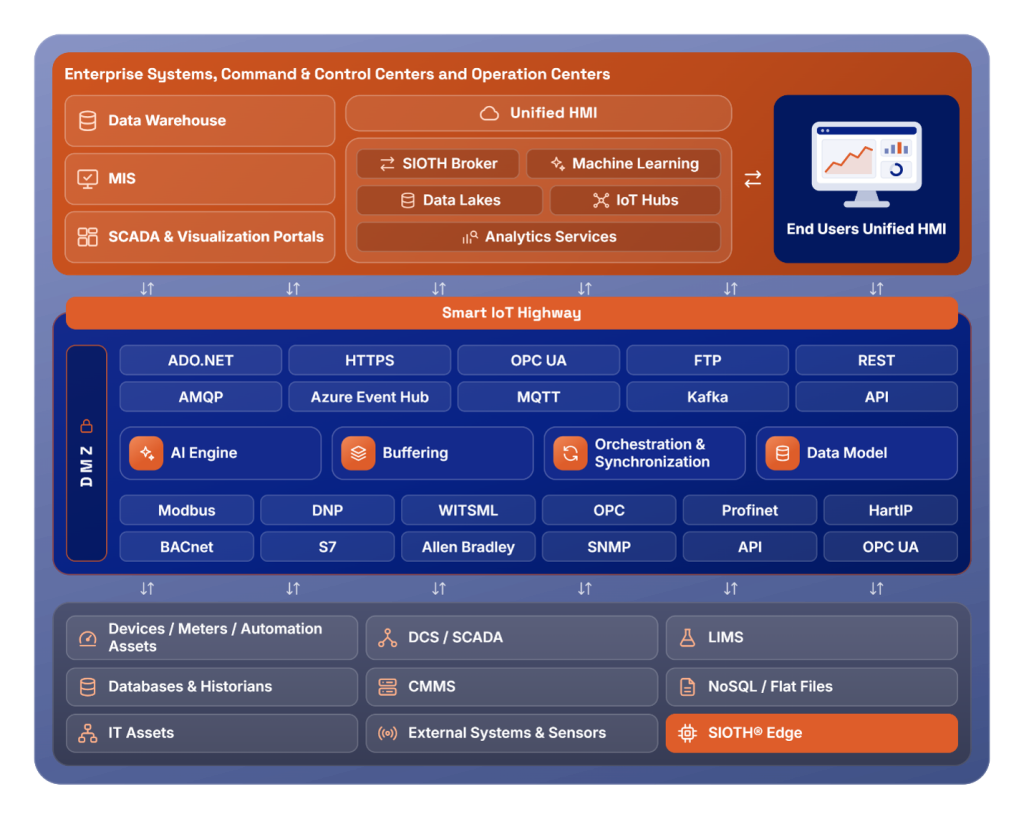
SIOTH® provides a unified industrial data and integration layer across heterogeneous operational environments. Rather than positioning SOE as another isolated data silo, SIOTH® can provide the integration, historical data, and visualization foundation on which a centralized SOE application is built.
An SOE architecture based on SIOTH® can collect event information from PLCs, DCSs, SCADAs, electrical systems, and other industrial sources through appropriate interfaces, including OPC UA, OPC Classic, databases, and other supported industrial interfaces.
When a source system does not provide the required alarms, SIOTH® can use the collected source data to configure and generate alarms based on defined conditions. These alarms can then be archived and exposed by OPC UA Universal Server through OPC UA Alarm & Conditions (OPC UA AC), providing a consistent alarm-management layer for sources that do not natively provide alarm information.
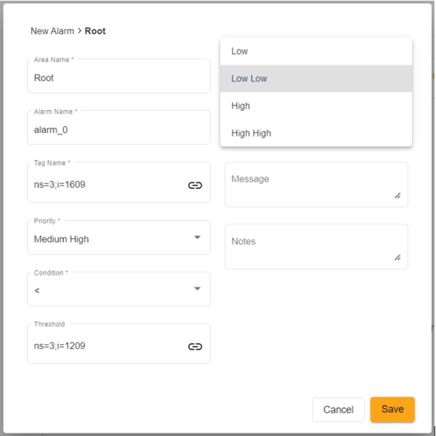
The result is a common operational view in which event history can be investigated together with process and equipment data.
How an SOE Application Based on SIOTH® Works
1. Data Acquisition
SIOTH® collects events from industrial sources through appropriate communication interfaces. Depending on the environment, sources may include OPC UA, OPC Classic, databases, and other industrial interfaces.
The acquisition layer can retrieve information such as:
- Event timestamp
- Event type
- Source
- Event state
- Message
- Alarm condition
- Severity
- Operator action
- Additional process context such as area, tag or variable
2. Historical Storage
Using SIOTH® data-storage capabilities and connectors, events can be archived in a centralized historical repository. Depending on the implementation, event information can be stored in SQL databases, historians, or other supported storage mechanisms.
The resulting repository can be queried by:
-
- Specific incidents
- Equipment
- Time periods
- Event types
- Severity
- Production areas
- Process units
Historical storage also enables organizations to compare similar incidents over time.
Managing Historical Alarms and Events data flow across IT/OT and the Cloud Securely
3. Visualization and Analysis
Users can access historical event information through dashboards and analytical interfaces using SIOTH® Unified HMI (UHMI). Typical capabilities include:
- Historical event browsing
- Event filtering
- Time-range analysis
- Event sorting
- Event grouping
- Equipment-based analysis
- Event frequency analysis
- Incident timeline visualization
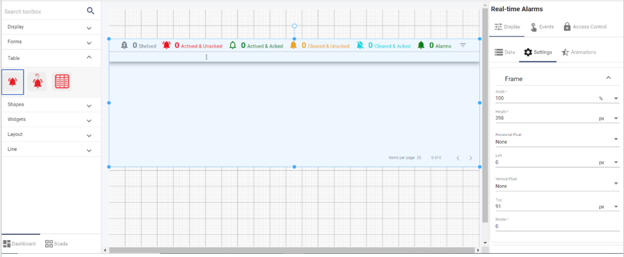
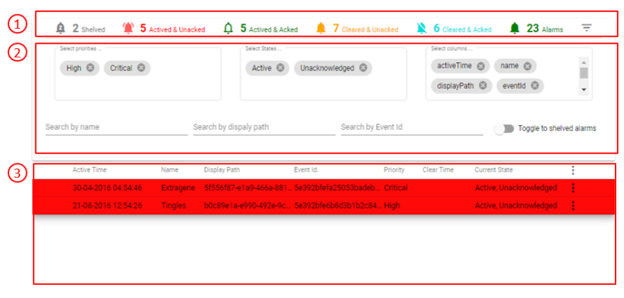
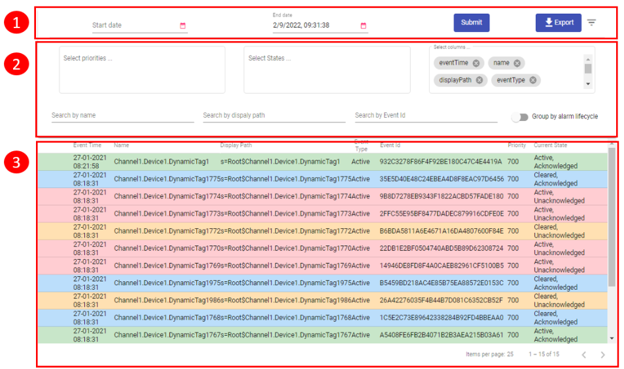
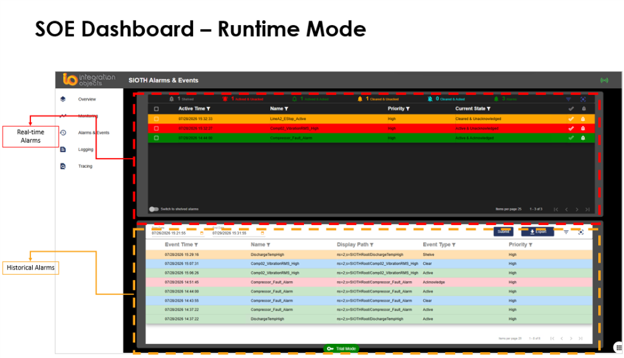
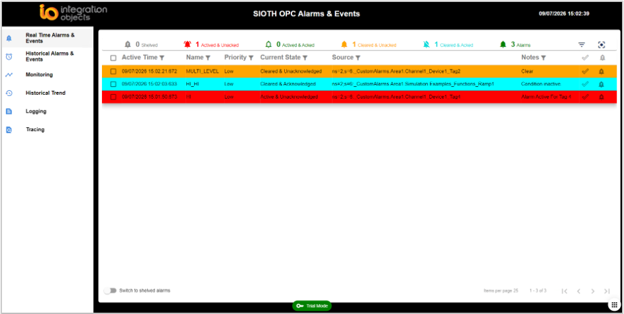
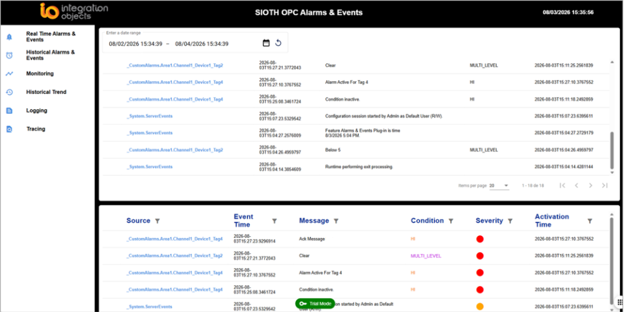
UHMI provides graphical and widgets that can be used to visualize and analyze real-time and historical alarm and events:
- Real-Time Alarms Table to display alarms collected via OPC UA AC and provide filtering and search capabilities.
- Historical Alarms Table to view historical alarms collected via OPC UA HE.
- Configurable tables providing access to stored event information, including data collected from SQL databases.
SOE Dashboards: Giving Engineers the Right View of an Incident
A good SOE application should make it easy for engineers to answer a simple question: “What happened immediately before, during, and after the incident?”
A typical SOE dashboard can provide a chronological event table with filters such as Time Range, Area, Equipment, Event Type, Severity, and Source. Users can then drill down into the event timeline.
For example, an engineer investigating a compressor trip could filter the event history to: Compressor C-201 → 13:00–13:15 → Trips + Alarms + Interlocks. The resulting timeline provides a focused view of the events surrounding the incident.
Combining SOE with Process Data
The value of an SOE platform increases when events can be analyzed alongside process and equipment data. SIOTH enables process data and alarm/event information to be gathered through supported industrial interfaces such as OPC UA and OPC Classic.
For example, an SOE record indicating a high-temperature alarm becomes much more useful when an engineer can also examine the corresponding temperature trend. This allows users to correlate:
Event → Process condition → Equipment response → Operator action
This contextual view helps move organizations from simple event recording toward operational intelligence.
Why Build SOE on an Industrial Data Platform?
A standalone SOE application can solve the immediate need for event collection and analysis. However, organizations increasingly need operational applications to work together.
An industrial data platform provides a foundation for connecting SOE with capabilities such as:
- SCADA
- Historian
- Reporting
- Dashboards
- Analytics
- Alarm management
- Equipment monitoring
- Industrial data integration
With SIOTH®, an SOE application can be dedicated to a specific machine or process unit while remaining part of a larger industrial information architecture. Instead of creating another isolated data silo, organizations can build a common layer through which operational information can be accessed and contextualized.
SOE Use Cases Across Industrial Operations
- Pump and compressor trips
Determine whether an equipment stop, process deviation, interlock, or protection action initiated the shutdown sequence.
- Electrical and protection events
Correlate breaker operations, protection relay trips, motor protection events, and process responses.
- Process shutdowns
Reconstruct the sequence across PLC, DCS, SIS, SCADA, and operator actions.
- Recurring equipment failures
Compare historical event sequences to identify recurring patterns and potential reliability issues.
- Incident investigation and audit
Provide a consistent chronological record that supports post-event investigation and reporting.
Key Benefits of a SIOTH®-Based SOE Application
- Centralized Event History
Consolidate event information from multiple industrial systems into a centralized historical repository.
- Faster Troubleshooting
Provide chronological event timelines that simplify incident investigation.
- Better Root-Cause Analysis
Help distinguish initiating events from secondary alarms and cascading conditions.
- Cross-System Visibility
Correlate events generated by different PLCs, DCSs, SCADAs, SIS, electrical systems, and other industrial sources.
- Web-Based Access & Configurable Dashboards
Provide authorized users with access to event information through modern web interfaces configured through UHMI Designer.
- Scalable Architecture
Allow the SOE environment to evolve as additional systems, production units, and data sources are introduced.
- Foundation for Advanced Analytics
Use historical event data as an input to analytics, pattern recognition, and predictive operational applications.
Discover SOE with SIOTH®
Your control systems know what happened. The challenge is understanding what happened across all of them.
SIOTH® provides an industrial data and integration platform for connecting heterogeneous operational systems and making industrial information accessible through a unified environment.
By building SOE capabilities on this foundation, organizations can transform fragmented alarm and event data into a centralized, contextualized source of operational insight—helping operators, engineers, and reliability teams investigate incidents faster and make better decisions.
Frequently Asked Questions About Sequence of Events (SOE) Management
How is SOE different from an alarm historian?
A conventional alarm historian mainly answers when an alarm occurred, was acknowledged, or returned to normal. An SOE application goes further: it focuses on ordering and correlating events across systems to identify which event initiated a sequence and which events were consequences, which a per-alarm history alone does not show.
Why do timestamps matter so much in SOE analysis?
In fast-moving incidents, events can occur milliseconds apart. If contributing systems are not time-synchronized, events can appear out of order. Source timestamps from the originating PLC, DCS, or protection relay are preferable to reception timestamps, and site-wide synchronization such as NTP or PTP is a prerequisite for reliable cross-system sequencing.
Does my SCADA system already have SOE built in?
Many SCADA and control platforms include a native alarm history or sequence view, and for a single-system environment this is often sufficient. The limitation appears when an incident spans multiple systems such as PLCs, DCS, SCADA, SIS, and electrical systems, since a platform-native view is generally scoped only to the system it runs on.
What systems can feed into a SIOTH®-based SOE application?
A SIOTH® based SOE architecture can collect event information from PLCs, DCS platforms, SCADA systems, electrical and protection systems, and other industrial sources through interfaces such as OPC UA, OPC Classic, and databases.
Can SOE data be combined with process data for deeper analysis?
Yes. SIOTH® allows process data and alarm/event information to be gathered through the same industrial interfaces, so an event such as a high-temperature alarm can be examined alongside the corresponding temperature trend, moving teams from simple event recording toward operational intelligence.