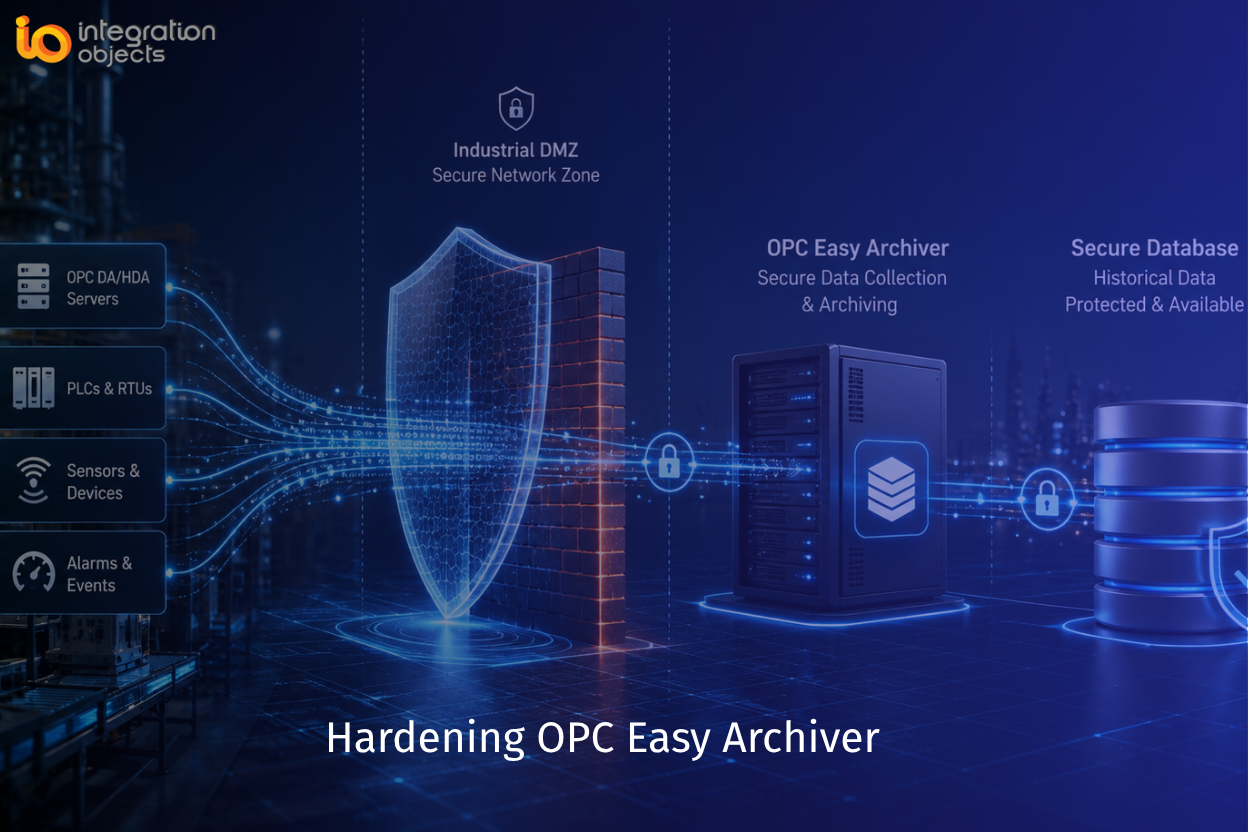
Hardening OPC Easy Archiver means reducing its attack surface across five layers: the Windows host it runs on, the Windows service and database accounts it uses, its network communications (including DCOM for remote OPC Classic connections), its configuration and GUI access, and the archived data itself.
Industrial data historians and archivers often become a bridge between operational technology (OT) and enterprise IT. As such, an improperly configured archiver can become an attractive target for attackers seeking access to industrial data or control systems.
This article provides practical recommendations for securely deploying and operating OPC Easy Archiver in production environments. The recommendations are based on industrial cybersecurity best practices (IEC 62443, NIST CSF) and the capabilities of the OPC Easy Archiver product, as well as Integration Objects’ extensive experience delivering industrial connectivity and OT cybersecurity solutions.
Download OPC Easy Archiver for Free
Why Hardening Matters
OPC Easy Archiver typically has access to:
- Multiple OPC DA, HDA and AE servers
- SQL databases
- Real-time production data
- Historical production data
- Alarm and event information
Compromise of the archiver or its host system could expose sensitive operational data, disrupt data collection, or provide attackers with a pivot point into the OT environment.
-
Harden the Host System
OPC Easy Archiver is primarily an archiving service that runs on Microsoft Windows. Consequently, it relies on the host operating system for user authentication, authorization, access control, and many other platform-level security functions. Therefore, hardening an OPC Easy Archiver deployment begins with hardening the underlying Windows host.
Apply your organization’s Windows security baseline, including:
- Install the latest security updates and patches.
- Remove or disable unnecessary software, services, and features.
- Restrict local and remote administrative access.
- Enable Windows Defender or an equivalent endpoint protection solution.
- Enable audit logging and forward security events to a centralized logging or SIEM solution where applicable.
- Restrict access to the installation and configuration directories using NTFS permissions.
- Apply security policies in accordance with your organization’s standards (e.g. password policies, account lockout, and device control).
-
Secure Remote OPC Communications
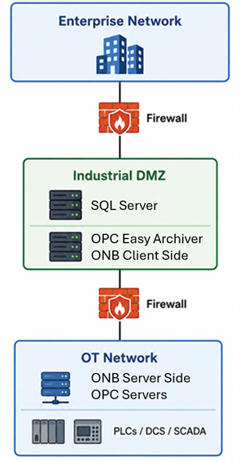
OPC Easy Archiver natively uses OPC Classic to collect industrial data. For remote OPC connections, OPC Classic relies on Microsoft DCOM, which presents both security and configuration challenges. As a best practice, deploy OPC Easy Archiver together with OPCNet Broker (ONB). OPCNet Broker securely tunnels OPC Classic communications over a single configurable TCP port, eliminating the need for DCOM across the network while providing encrypted communications and authenticated connections between OPC clients and servers. This approach simplifies firewall configuration and significantly strengthens the security of remote OPC deployments.
Recommended architecture:
Best practices:
- Separate OT from IT using firewalls.
- Allow only required communications.
- Never expose OPC Classic/DCOM directly and outside the OT network.
- Avoid installing OPC Easy Archiver directly on business network workstations.
-
Use a Dedicated Windows Service Account
OPC Easy Archiver runs as Windows services. Do not run these services using:
- Local System
- Local Administrator
- Domain Administrator
Instead:
- Create a dedicated service account.
- Grant only the permissions required to:
- Connect to OPC servers
- Access the configured databases
- Access with read/write to the OPC Easy Archiver installation folder
- Access with read/write to the Windows registry
Example: DOMAIN\svc_OPCArchiver
Permissions:
✓ Log on as service
✓ Database access
✓ OPC access
✗ Interactive logon
✗ Local administrator
-
Apply Least Privilege to Database Accounts
Avoid using: sa, root, postgres, SYSTEM accounts
Instead create a dedicated account such as: opc_archiver
Grant only:
- INSERT
- UPDATE
- SELECT
Avoid granting:
- ALTER
- CREATE DATABASE
- DROP TABLE
- sysadmin
-
Secure Database Connections
Whenever supported by the database platform:
- Enable TLS encryption
- Require certificate validation
- Disable anonymous database access
- Restrict SQL access using firewall rules
Configure the database server to accept connections only from authorized hosts. Ensure that the OPC Easy Archiver host is explicitly authorized to connect, while blocking access from untrusted systems.
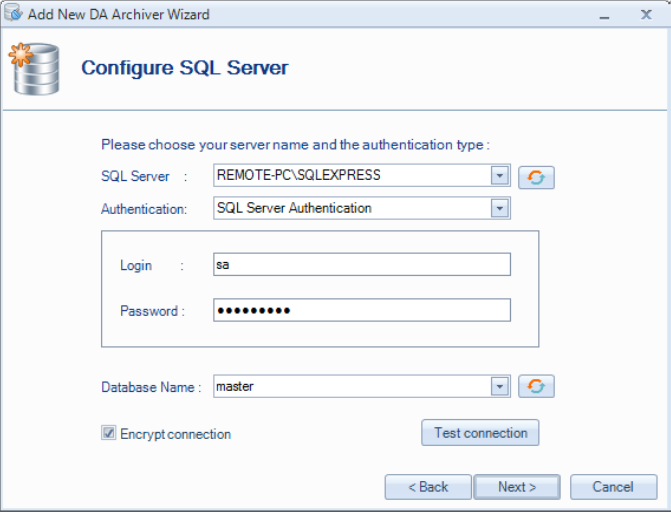
For example, if you are using a remote SQL database server, communications between the OPC Easy Archiver and SQL can be protected using TLS to prevent interception or tampering. This is a configuration enabled on both SQL server and in the OPC Easy Archiver connection settings.
-
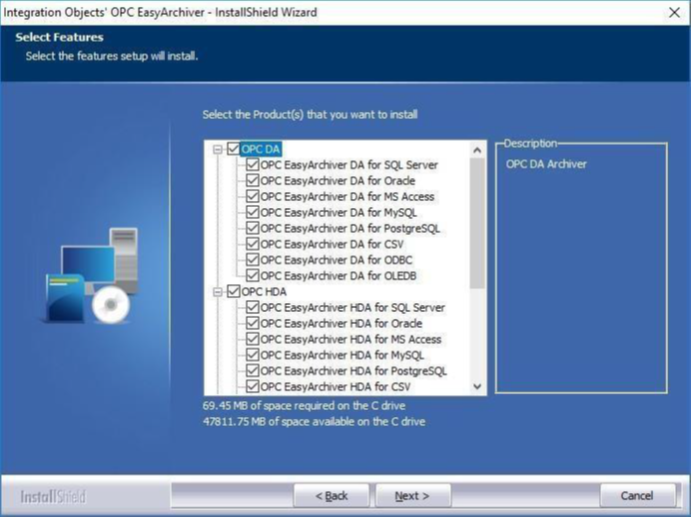
Do not Install Unused Features
Unused functionality represents unnecessary attack surface. When installing the OPC Easy Archiver, select the required features only.
-
Minimize OPC Server Permissions
Only configure access to the OPC servers that are actually required.
Avoid:
- Browsing unnecessary servers
- Connecting to unused remote OPC servers
Only subscribe to:
- Required OPC tags
- Required AE subscriptions
Reducing the attack surface also improves performance.
-
Protect Your OPC Easy Archiver Configuration
Recommendations:
- Backup your XML and oda configuration files
- Do not keep the graphical configuration environment open. Once you configure your connections and archivers, you may close the GUI. The services will remain working in the background.
- Lock access to the graphical configuration environment to avoid unauthorized access or changes by enabling the built-in GUI authentication feature to help prevent unauthorized configuration changes. This feature complements, but does not replace, Windows authentication and file system permissions.
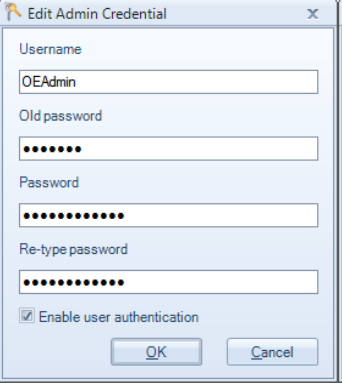
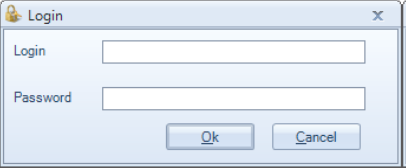
This will prompt the user to login whenever he opens the configuration GUI:
-
Protect Windows Services
Ensure:
- Only administrators can stop services.
- Service recovery actions are configured.
- Unexpected service termination generates alerts.
Recommended recovery:
- First failure → Restart service
- Second failure → Restart service
- Subsequent failures → Restart service
-
Secure DCOM (OPC Classic)
Because OPC Easy Archiver communicates with OPC Classic servers, DCOM security is important.
Recommendations:
- Restrict Launch Permissions
- Restrict Access Permissions
- Restrict Configuration Permissions
- Remove Everyone permissions
- Remove Anonymous access
- Limit Remote Activation
Having said that, refer to the section “Secure Remote OPC Communications” for a secure replacement of DCOM.
If remote OPC communications are unnecessary, disable remote DCOM access.
-
Restrict Firewall Rules
Only allow required ports.
Examples:
- SQL Server
- Oracle
- PostgreSQL
- MySQL
- Required DCOM traffic (if unavoidable)
- Required ONB tunnel
Block all other inbound connections.
-
Monitor Storage Capacity
An archiver can stop archiving data if storage becomes exhausted.
Monitor:
- Disk utilization
- Database growth
- CSV storage
- Log file size
Configure alerts before reaching critical thresholds.
In such cases, OPC Easy Archiver will store the collected data in local flat files to be used later for data recovery when issues with database servers are resolved.
-
Secure Archived Data
Historical production data may contain sensitive operational information.
Protect it using:
- Database access controls
- Encryption at rest (where supported)
- Secure backups
- Retention policies
- Audit logging
-
Use Change-Based Collection Where Appropriate
When possible, use OnDataChange subscriptions instead of aggressive polling when configuring your OPC groups in the OPC Easy Archiver.
Benefits include:
- Reduced network traffic
- Lower CPU utilization
- Smaller database footprint
- Reduced risk of overwhelming OPC servers
OPC Easy Archiver supports OnDataChange, synchronous, and asynchronous read modes for OPC DA communications.
-
Validate Automatic Recovery Behavior
OPC Easy Archiver supports the following features to assist users to manage network or database outages
- Automatic reconnection
- Store-and-forward buffering
- Manual recovery capabilities
Regularly test:
- Database outages
- OPC server failures
- Network interruptions
- Recovery after restart
This helps ensure data integrity during fault conditions.
-
Periodically Review Configuration
At least annually, verify:
- Unused OPC connections removed
- Service account permissions
- Database permissions
- Firewall rules
- User accounts
- Windows updates
- Latest configuration backups
If you are using the rules feature in the OPC Easy Archiver, review all rules periodically to ensure they remain necessary and behave as intended.
Hardening Checklist
| Area | Recommendation |
|---|---|
| Windows Services | Use dedicated least-privilege service account |
| Database | Dedicated account with minimal privileges |
| Network | Deploy behind industrial firewalls |
| DCOM | Eliminate DCOM configuration complexity and vulnerabilities by using OPCNet Broker tunneling product |
| Firewall | Open only required ports |
| OPC Servers | Connect only to required servers and tags |
| Database Connections | Use encrypted connections where supported |
| Logging | Enable Windows auditing and centralized log collection |
| Updates | Keep Windows, dependencies, and OPC Easy Archiver current |
| Backup | Regularly back up configuration and archived data |
| Storage | Monitor disk and database growth |
| Access Control | Limit administrative and OPC Easy Archiver configuration access to authorized personnel |
Modernize Your Data Archiving with SIOTH®
Need an archiver with native OPC UA connectivity? SIOTH® is designed for modern industrial systems, enabling you to securely collect real-time data, historical data, and alarms & events from OPC UA servers and archive them in SQL-compatible databases. With native OPC UA support, SIOTH eliminates the complexity of OPC Classic and DCOM while providing a secure and scalable foundation for industrial data management.
Conclusion
Although OPC Easy Archiver is primarily a lightweight OPC Classic data collection service rather than a user-facing application, it occupies a critical position between industrial control systems and data repositories. Hardening its Windows host, service accounts, network connectivity, database access, and operational configuration significantly reduces cybersecurity risk while improving the reliability and integrity of archived industrial data.
Following these recommendations also helps organizations align with the cybersecurity principles of IEC 62443, and common industrial security best practices, even where specific controls are implemented through the underlying Windows operating system rather than the application itself.
Frequently Asked Questions
Can I run OPC Easy Archiver without any Windows domain, using local accounts only?
Yes. A dedicated local service account with least-privilege permissions works the same way a domain account does. The important part is that the account isn't Local System, Local Administrator, or any other broad-privilege account, regardless of whether it's local or domain-based.
What happens to data collection if the database becomes unreachable?
OPC Easy Archiver's store-and-forward capability keeps collecting to local flat files during the outage, then recovers the buffered data into the database once connectivity is restored. This is why monitoring local disk capacity (Section 12) matters as much as monitoring the database itself. If local storage fills up during an extended outage, data loss becomes possible.
Is TLS encryption for database connections mandatory?
It should be treated as mandatory whenever the database is on a separate host from OPC Easy Archiver, since that traffic crosses the network and could be intercepted.
Having said that, from a technical perspective, it is not inherently mandatory for every deployment. Some organizations may rely on other controls, such as a fully isolated network segment, VPN/IPsec encryption, physical network protections, or strict access controls.
If the database runs locally on the same machine, the risk is lower, but enabling TLS is still good practice wherever the database platform supports it.
Does hardening DCOM mean OPC Easy Archiver will stop working with older OPC DA servers?
It can, if those servers were built against outdated DCOM authentication defaults and don't support the hardened authentication levels Microsoft now enforces. This is one of the main reasons this guide recommends replacing DCOM with ONB tunneling rather than trying to fully harden DCOM itself. Tunneling sidesteps the compatibility problem entirely instead of requiring every legacy OPC server on the network to support modern DCOM security settings.
How often should the hardening checklist actually be reviewed?
At minimum, annually, per Section 16, but any change to the environment should trigger an out-of-cycle review too: a new OPC server added, a service account permission change, a new firewall rule, or a Windows or OPC Easy Archiver version upgrade.
Does this guide cover OPC UA deployments, or only OPC Classic?
This guide is specifically for OPC Easy Archiver's native OPC Classic (DA/HDA/AE) connectivity, since that's where DCOM and its associated hardening challenges apply.
For OPC UA support, you may combine OPC Easy Archiver with OPC UA Proxy product.
Is enabling user authentication on the configuration GUI enough to prevent unauthorized changes?
It prevents unauthorized access to the configuration interface, but it doesn't replace OS-level access control. Anyone with sufficient Windows privileges on the host could still stop services, modify configuration files directly, or alter permissions outside the GUI, which is why Sections 1, 3, and 8 all need to be applied together rather than relying on any single control.