Distributed Component Object Model (DCOM) is a proprietary Microsoft Windows technology. It enables software components to communicate directly over a network. Components on a server and a client need to be configured and must correspond with each other to enable the DCOM network communication.
Windows lists components requiring DCOM communication in the Management Console, accessed using the Component Services dialog box or by running the dcomcnfg command.
How DCOM actually works
DCOM is an extension of COM (Component Object Model), the standard Microsoft framework that lets 2 programs running on the same Windows machine share data and call each other’s functions. DCOM takes that same idea and extends it across a network: a program on one computer can call functions on a component running on a remote computer.
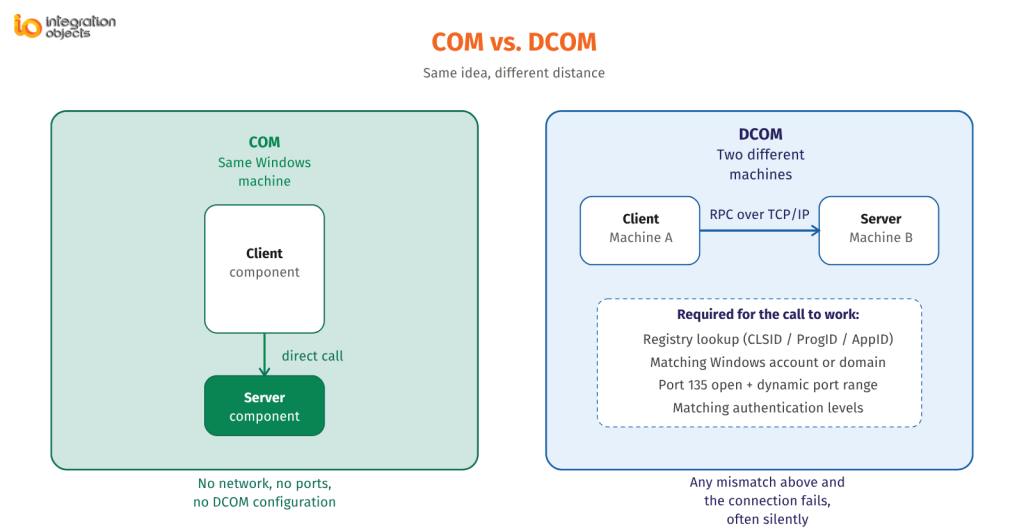
To make that work, DCOM handles 3 things transparently in the background:
- Locating the component using identifiers stored in the Windows Registry (CLSID, ProgID, and AppID) so the client machine knows which component to talk to and on which machine.
- Authenticating the connection using Windows user accounts, either through Active Directory/Kerberos in a domain environment or matching local accounts in a workgroup.
- Transporting the calls over TCP/IP, using a Remote Procedure Call (RPC) mechanism, with a directory port (TCP 135) that tells the client which dynamic port the target component is actually listening on.
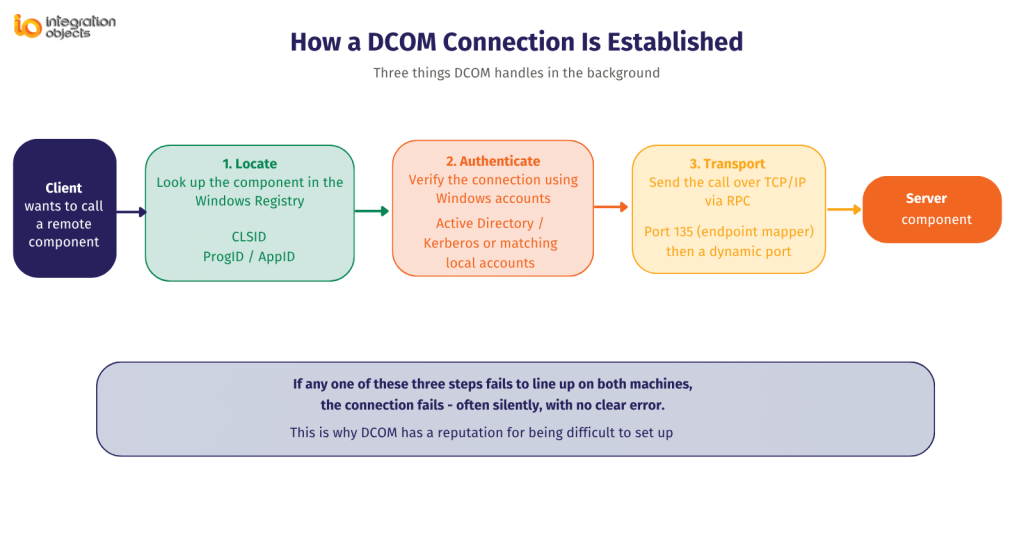
COM vs. DCOM in one line: COM is local, in-machine communication between software components. DCOM is that same communication extended across a network. An OPC server is a COM server whether it’s accessed locally or remotely. Windows decides which path (local COM or networked DCOM) to use based on whether the client and server are on the same machine.
This is also why DCOM has a reputation for being difficult: it depends on registry configuration, matching Windows credentials, dynamic port negotiation, and firewall rules all lining up correctly on both the client and server machines. A mismatch in any one of them causes the connection to fail – often silently.
Why do you need DCOM for OPC Classic?
OPC Classic DA (Data Access), A&E (Alarms & Events), and HDA (Historical Data Access) communications are based on COM and DCOM technology. Indeed, OPC clients and servers use COM to communicate with each other when deployed on the same machine and use DCOM for the remote communications across a network.
| OPC Classic specification | What it does |
Relies on DCOM when… |
| OPC DA (Data Access) | Real-time process data exchange between servers and clients | Client and server run on different machines |
| OPC A&E (Alarms & Events) | Deliver alarm and event notifications from industrial systems | Alarm client is on a separate machine from the alarm/event server |
| OPC HDA (Historical Data Access) | Retrieve stored historical process data from a historian | The historian client queries a historian server remotely |
This is the reason DCOM shows up so often in industrial environments: most SCADA architectures don’t run every OPC client and server on a single machine. A historian, a remote HMI, or a secondary SCADA node typically needs to pull data from an OPC server sitting elsewhere on the plant network, and that’s exactly the scenario where DCOM configuration becomes unavoidable, and where most connectivity problems originate.
How to configure DCOM to enable remote OPC communications?
You can download our DCOM configuration guidelines document from here to properly configure DCOM and enable remote communications between your OPC client and OPC server components. These guidelines include detailed instructions on how to configure DCOM related settings in the OPC server machine and in the OPC client machine.
At a glance, correct DCOM configuration for remote OPC communications typically requires:
- Matching Windows user accounts (same username/password) on both machines in a workgroup, or domain membership with Kerberos authentication.
- Launch and Access permissions granted to the client identity in dcomcnfg.exe (Component Services → My Computer → DCOM Config → [OPC server application] → Security tab).
- TCP port 135 open inbound on the OPC server machine for the RPC Endpoint Mapper.
- A defined dynamic port range (rather than the full 1024–65535 range) opened in the firewall, to avoid exposing thousands of ports.
- Consistent DCOM authentication levels between client and server, especially important since 2022 (see hardening note below).
Most common failure points: mismatched Windows credentials between machines, missing Launch/Access permissions, and firewall rules that only open port 135 but not the dynamic data port range. Our full configuration guide above walks through each of these step by step.
Are you looking for a solution to eliminate DCOM?
We recommend you the OPCNet Broker® product, which is our OPC tunneling product. Indeed, it allows you to securely establish remote OPC communications using a single TCP port. Click here to learn more about OPCNet Broker and how it can secure your OPC connections and data flows. OPCNet Broker® is an OPC Tunneling product that enables OPC Classic communications through firewalls and NAT and across domains, while ensuring data in-transit confidentiality and integrity.
| Raw DCOM | OPCNet Broker® (OPC Tunneling) | |
| Firewall ports to manage | Port 135 + a dynamic range | Single configurable TCP port |
| Windows account matching required | Yes | No |
| Works across domains / workgroups | Difficult, error-prone | Yes, by design |
| Works through NAT | No | Yes |
| Affected by Windows DCOM hardening updates | Yes | No |
| Setup complexity | High | Low |
Are you looking for a solution to support Windows DCOM Server Security Feature Bypass vulnerability fix?
Alternative and secure solutions exist to support the latest Windows DCOM hardening update and still allow remote OPC Classic communications. Refer here for our blog post on the subject.
Timeline, for context: Microsoft began progressively tightening DCOM authentication requirements starting in 2021 in response to a DCOM security vulnerability, initially as an optional update, then enabled by default in 2022, and finally made mandatory with no opt-out in 2023. Any OPC Classic deployment using older, unpatched clients against a hardened server will fail to authenticate – which is a large part of why OPC tunneling (OPCNet Broker) or a migration to OPC UA is now the recommended path for new or growing remote OPC Classic deployments rather than continuing to patch around DCOM.
Frequently Asked Questions About DCOM
Does DCOM affect OPC UA the same way it affects OPC Classic?
No. OPC UA does not use COM or DCOM at all. It communicates directly over TCP/IP with its own built-in security model (certificates and encryption), which is one of the reasons OPC UA was designed to replace OPC Classic for new industrial connectivity projects.
What's the difference between OPC tunneling and configuring DCOM correctly?
Configuring DCOM correctly (matching accounts, permissions, firewall rules) makes DCOM work but doesn't remove its complexity or its exposure to future Windows hardening updates as well as security vulnerabilities. OPC tunneling, like OPCNet Broker®, removes DCOM from the remote connection entirely, replacing it with a secure tunnel established via a single TCP port.
Can DCOM work across a domain or through NAT?
Raw DCOM is difficult to configure across domains and does not work through NAT without additional and significant configuration. This is one of the main reasons industrial sites move to OPC tunneling for multi-site or firewall-segmented architectures.
Do I need DCOM if my OPC server and client are on the same machine?
No. When the OPC client and OPC server run on the same Windows machine, communication uses local COM, not DCOM, and none of the DCOM firewall, configuration complexity, authentication, or hardening considerations apply.