


One archiver for real-time data, history, and alarms
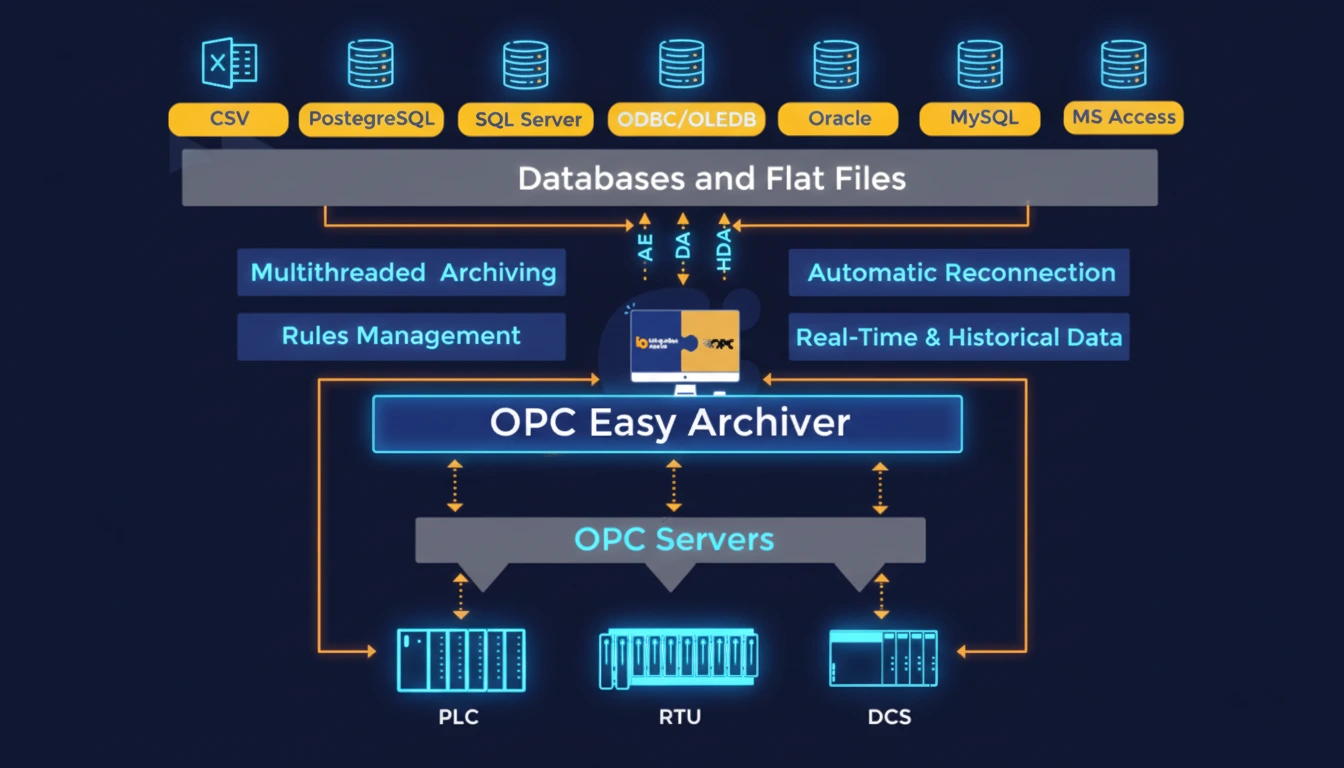
- Archive OPC DA, HDA, and AE data with a lightweight, reliable product
- Archive data into SQL-like databases or CSV files with minimal setup
- Connect to multiple OPC servers simultaneously
- Capture real-time data, historical data, and alarms and events automatically
- Prevent data loss during network or system interruptions with built-in buffering
- Ensure fast recovery with automatic reconnection
- Control event handling with flexible, rule-based configurations
OPC Easy Archiver Licensing Options
OPC Easy Archiver licenses provide access to a range of archiving capabilities designed to support different data sources, storage environments, and operational requirements. The license model of the OPC Easy Archiver depends on the selected OPC specifications and databases or file connectors:
Data collection and archiving, step by step
OPC Easy Archiver sits between your OPC servers and your database as a Windows service. No manual intervention is required once configured.
Connect
Link to one or more local/remote OPC DA, HDA & AE servers simultaneously.
Collect
Pull real-time values, historical trends, and alarm/event streams on your schedule.
Historize
Write to SQL Server, Oracle, MySQL, PostgreSQL, Access, or CSV on reconnect.
Buffer
If the database or network drops, data queues locally instead of being lost.
Forward
Forward buffered data when communications are up (manually or automatically)
Operating System Compatibility
Client Operating Systems
Server Operating Systems
OPC Version Compatibility
Why Teams Switch.
10–30 min
Typical time to a working configuration, from install to first archived tag.
300+
Documented OPC Easy Archiver deployments across process industries.
0 data loss
On network or database interruption, when store-and-forward buffering is enabled.
OPC Easy Archiver is quick to install and configure – most users are up and running within 10 to 30 minutes.
For basic setups, such as connecting a single OPC AE server to a database, the process is simple and straightforward.
Even more advanced configurations involving multiple servers or custom database mappings can be completed with minimal effort. Our team is available to assist if needed, but in most cases, deployment is fast and hassle-free.
Not at all. OPC Easy Archiver is built with user-friendly configuration tool, so you can set up connections and archivers, and schedule rules through an intuitive graphical user interface, no coding required.
OPC Easy Archiver is designed to work with your existing storage infrastructure and helps you optimize usage through:
- Change-based logging: Store only data value changes instead of fixed intervals
- Lightweight output formats: log to SQL databases or compact CSV files
Based on our analysis of 300+ implementations, typical OPC Easy Archiver ROI includes: 60% average cost reduction:
Through optimized storage and compression, 80% reduction in data loss: Through reliable archiving, 90% faster data retrieval: Through advanced search capabilities, 100% compliance achievement: Through automated audit trails
OPC Easy Archiver covers OPC Classic - DA, HDA, and AE. If you need OPC UA connectivity, pair it with Integration Objects' OPC UA Proxy, which bridge UA sources into the same archiving pipeline.
Buffered data is written to local storage and forwarded in order once the connection with the database server is restored.
Buffer capacity is limited by available local disk space rather than a fixed time window. For outages expected to run more than a few hours, confirm available disk headroom on the archiver host.
A single OPC Easy Archiver instance can connect to multiple local and remote OPC servers concurrently. Depending on the number of tags, architecture and cyber security constraints, users typically choose to run multiple instances of the OPC Easy Archiver with a shared central database.
OPC Easy Archiver Resources
Blog Post
Hardening OPC Easy Archiver: Security Best Practices for Industrial Deployments
User Guide
Step-by-step installation and configuration guide
Quick User Guide
Step-by-step installation and configuration guide
Product Demo Video
See the OPC product in action with real-world examples