OPC tunneling is a method for moving OPC Classic data (DA, HDA, and AE) across a network by replacing DCOM with a single, configurable TCP/IP connection. When implemented right, it removes the dynamic port ranges, domain-trust requirements, and long timeout windows that make DCOM unreliable across firewalls, adds a security layer and lets OPC clients and servers communicate as if they were on the same machine.
What is OPC tunneling?
OPC Classic, the family of OPC standards that mainly includes OPC DA (Data Access), OPC HDA (Historical Data Access), and OPC AE (Alarms and Events), was built in the 1990s around Microsoft Windows. Microsoft’s Component Object Model (COM) and DCOM as its distributed extension, were the natural choice as it was the dominant Microsoft technology for creating standardized, language-independent software interfaces on Windows. COM was designed for applications talking to each other on the same machine and DCOM for applications communication within the same tightly managed Windows domain. It was never designed for the firewall-separated, security-conscious networks that define modern industrial environments and where an OT network and an IT network are deliberately kept apart.
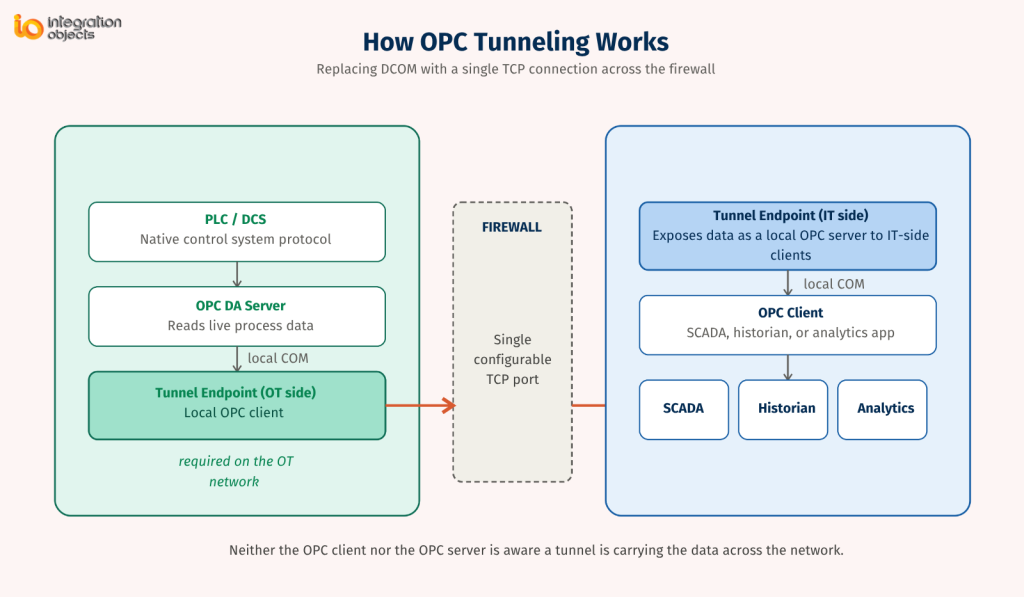
OPC tunneling closes DCOM gaps without replacing OPC Classic itself. The tunneling software can be considered as a small piece of software installed on both the machine hosting the OPC server and the machine hosting the OPC client. Each tunneling component connects to its local OPC application using ordinary COM, exactly as if the OPC client and server were on the same computer. The 2 tunneling components then exchange data with each other over a single TCP/IP connection, typically encrypted, that can pass cleanly through a firewall or NAT. From the point of view of the OPC client and the OPC server, nothing has changed: neither application is aware that a tunnel, rather than a direct DCOM link, is carrying the data across the network.
This matters because the installed base of OPC DA, HDA, and AE systems in operating plants is enormous, and most of it is not being replaced any time soon. Tunneling gives that installed base a secure, modern, firewall-friendly way to keep working across network boundaries in a secure way and without touching the client or server software itself.
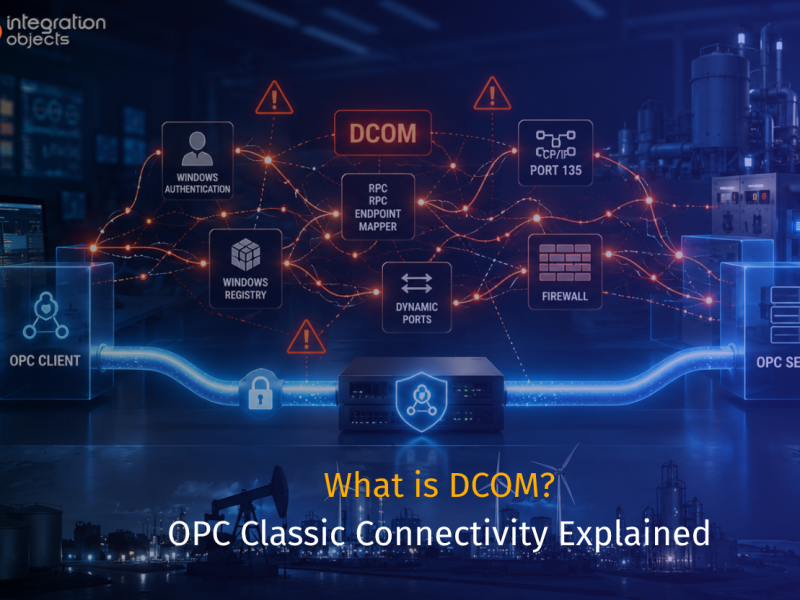
Why DCOM breaks down across networks
To understand why OPC tunneling exists, it is important to first understand the limitations of DCOM and the challenges of configuring it when an OPC connection must cross a network boundary.
- DCOM uses dynamic port allocation: a client first contacts the server’s DCOM endpoint mapper on TCP port 135, which then hands back a randomly assigned high-numbered port, typically somewhere in the 49152–65535 range, for the actual data exchange. A firewall separating two networks has exactly two options: open that entire dynamic range, which most security teams will not accept, or block OPC Classic traffic entirely, which defeats the purpose of connecting the systems at all.
- DCOM also expects matching Windows user accounts or a shared Windows domain on both the client and server machines, which is difficult to maintain when the two networks are administered separately.
- It has a hardcoded connection timeout of around six minutes, so a brief network interruption can leave an OPC client appearing to hang, sometimes requiring a manual restart to recover.
- And because DCOM predates modern network security practice, it has no built-in encryption: data crosses the network in the clear unless additional network measures are layered on top.
- A Windows security update, first released in 2021, tightened DCOM’s authentication requirements (Microsoft’s KB5004442 update in 2021), and working OPC Classic connections that relied on older, looser settings stop functioning until they’re rebuilt or at least reconfigured.
- DCOM’s vulnerabilities are well documented, both inside and outside the process control community: any port or service it opens becomes a target hackers can probe with off-the-shelf exploit scripts.
- Getting DCOM to work reliably when the client and server are on separate machines is a leading source of support escalations. Configuration can take days or even weeks, often requiring expert assistance and a trial-and-error approach to identify the correct settings. .
- DCOM cannot traverse Network Address Translation (NAT). Because DCOM relies on RPC endpoint negotiation and dynamically assigned ports, NAT can disrupt endpoint resolution and subsequent RPC connections.
How OPC tunneling works
At a technical level, an OPC tunneling deployment pairs two components: one installed on the machine hosting the OPC server, the other on the machine hosting the OPC client. Each component connects to its local OPC application over ordinary COM – exactly as if the OPC client and the OPC server were on the same machine – and registers itself locally as the counterpart the client or server is expecting to talk to.
The two components exchange data over a single, secure TCP connection that crosses the firewall. In a typical reference architecture, the server-side component listens on a configured port and the client-side component initiates the connection to it, so only that one port ever needs to be opened – a sharp contrast to DCOM’s wide, dynamic port range. Rather than keeping an independent mirror of the server’s data, each component acts as a transparent relay: when the OPC client issues a read, write, or subscription request, the tunnel forwards it across the connection to the real OPC server in real-time and relays the response back.
What a robust tunneling solution should provide
Not every tunneling implementation offers the same level of security or reliability. Whichever solution you evaluate, look for the following as baseline requirements rather than optional extras:
- A single, user-configurable TCP port, rather than a fix or well-known port
- Configurable data encryption paired with secure user authentication, password-based or tied to Windows accounts, rather than relying on default, unauthenticated settings
- User authentication and, ideally, role- or tag-level access control
- Configurable timeout parameters for fast break detection, well under DCOM’s multi-minute timeout
- Automatic reconnection allowing the two tunneling components to reestablish communications after network glitches without requiring user intervention
OPC tunneling vs. OPC UA
OPC UA solves the same cross-network problem, but from a different direction. Rather than adding a transport layer on top of OPC Classic, OPC UA was designed from the ground up on TCP/IP, with security, authentication, and firewall-friendly communication built into the protocol itself in order to replace OPC Classic. Where both the OPC server and every OPC client involved support OPC UA, a direct UA connection is generally the cleanest long-term architecture, and the recommended path for new deployments.
In practice, that condition is not often met. A large share of installed OPC DA servers won’t be replaced soon; some client applications only ever shipped with DA support. Tunneling and OPC UA are not mutually exclusive. They address different stages of the industrial connectivity journey. For existing OPC Classic environments, OPCNet Broker® DA HDA AE eliminates DCOM from remote OPC DA, HDA and AE communications, providing secure and reliable connectivity across networks, firewalls and NAT. For organizations looking to modernize their architecture, OPC UA Wrapper provides a bridge between legacy OPC Classic systems and OPC UA, enabling a gradual migration without replacing existing OPC infrastructure. For new and unified architectures, our OPC UA Universal Server provides a modern OPC UA layer for secure, standardized IT/OT connectivity. Together, these products allow organizations to address today’s OPC Classic connectivity challenges while establishing a practical path toward OPC UA modernization.
When to use OPC tunneling
- OPC DA across a firewall or NAT
This is the scenario tunneling was built for. An OPC DA server sits on one network segment; a historian, SCADA system, or analytics platform sits on another, separated by a firewall. DCOM cannot cross that firewall without opening an unacceptable port range. Tunneling solves it with a single, configurable TCP connection between the two endpoints – one port to open, instead of DCOM’s wide dynamic range.
- Cross-domain or workgroup environments.
Where OT and IT networks are administered separately – a common pattern in plants that keep operational systems out of the corporate Windows domain – DCOM’s requirement for matching user accounts becomes an ongoing maintenance burden, especially after password rotations or Windows updates. Tunneling authenticates independently of the underlying Windows accounts.
- Collecting OPC data from multiple remote sites.
When OPC servers sit at remote sites connected over WAN, cellular, or VPN links, DCOM’s timing assumptions break down almost immediately; the latency alone is often enough to cause failures. Tunneling, built on ordinary TCP, tolerates WAN latency and can secure data transfer from several remote sites into a single data set on a central endpoint.
- Recovering from a Windows security update that broke a working DCOM connection.
Every time Microsoft tightens DCOM’s security requirements, some previously working OPC Classic network connections stop functioning until reconfigured. Moving to tunneling removes OPC networking from that maintenance cycle.
Choosing a tunneling solution
Use the checklist above as a starting point for evaluating any tunneling product: ask specifically about port configuration, encryption, authentication granularity, communication time out.
Integration Objects’ OPCNet Broker® is built around these same principles. It tunnels OPC DA, HDA, and AE data over a single configurable TCP port, with data encryption, user authentication, and tag-level access control with its Tag Security add-on, and configurable communication timeouts. If your environment matches one of the scenarios above – particularly OPC DA crossing a firewall, NAT, network segmentation or DMZ – it’s worth a closer look.
See the step-by-step OPCNet Broker® setup guide
Frequently asked questions on OPC tunneling
Can OPC tunneling work over the internet, or only on a local network?
It works over any TCP/IP network, including wide-area networks, cellular connections, and VPNs. For internet-facing connections specifically, data encryption and authentication should always be enabled.
Is OPC tunneling actually secure?
When implemented with data encryption, authentication, and access control, tunneling is materially more secure than an unencrypted DCOM connection, which has no built-in encryption at all. Security depends on how the specific solution is configured, not on tunneling as a concept alone.