If your plant runs a SCADA (Supervisory Control and Data Acquisition) system, a historian or an HMI (Human-Machine Interface) older than about 2010, there is a good chance it still collects data over OPC DA (OPC Data Access; OPC stands for Open Platform Communications). New controllers, MES (Manufacturing Execution System) platforms and cloud tools, on the other hand, increasingly expect OPC UA. Understanding OPC DA vs OPC UA is therefore less an academic question than a practical one: which protocol should carry your data today, and how do you connect the two without replacing systems that still work?
This guide compares OPC DA and OPC UA across architecture, security, networking, data modeling and lifecycle, with diagrams for each, and then shows the realistic paths for moving from one to the other.
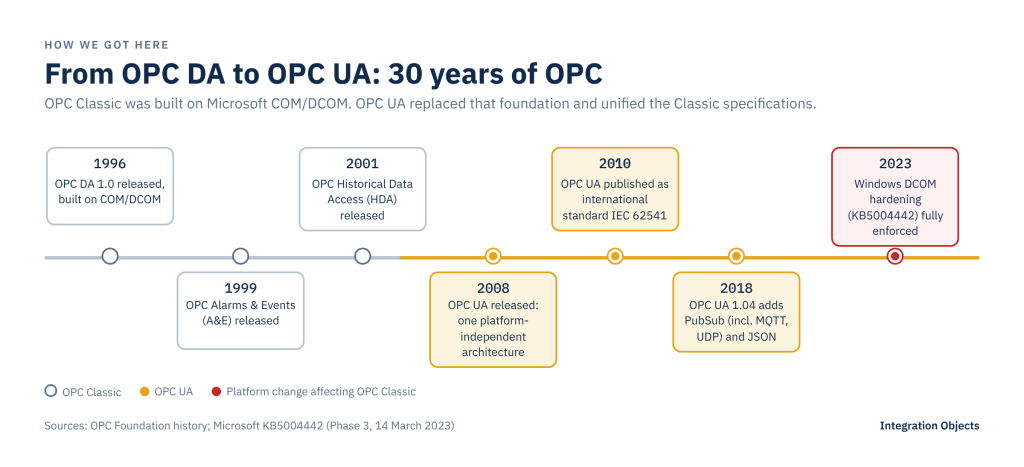
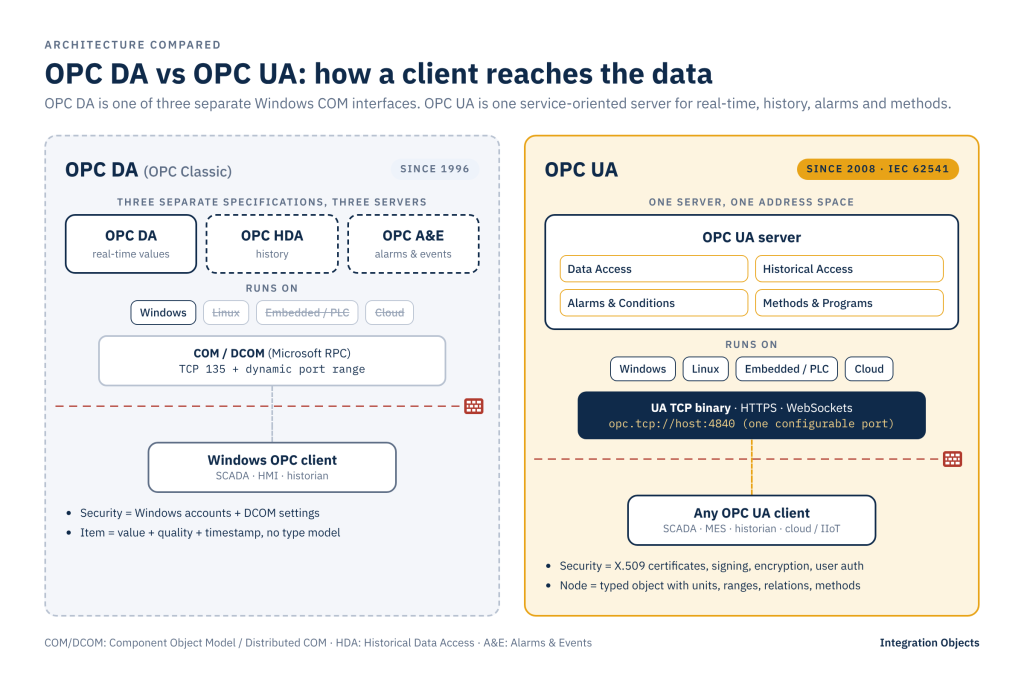
Quick answer: OPC DA (Data Access) is the original 1996 OPC Classic specification for reading and writing real-time values. It runs only on Windows and communicates over Microsoft COM/DCOM (Component Object Model / Distributed COM). OPC UA (Unified Architecture), released in 2008 and standardized as IEC 62541, is its platform-independent successor. It combines real-time data, history, alarms and methods in one server, builds security into the protocol, uses a single configurable port and describes data with a rich information model. Choose OPC UA for new projects; bridge OPC DA where existing servers or clients cannot be replaced yet.
Key takeaways
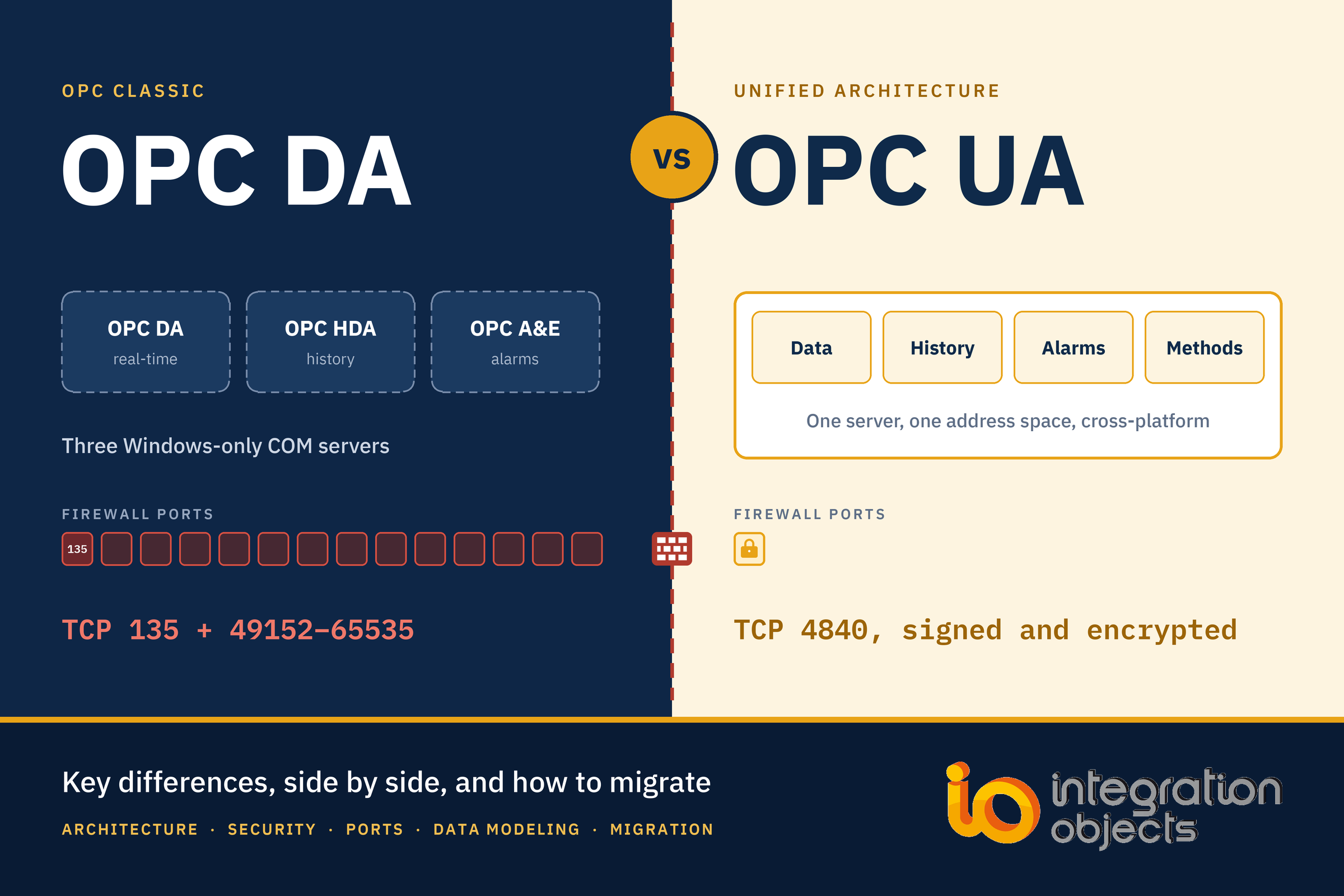
- Architecture: OPC DA depends on Windows COM/DCOM. OPC UA is a service-oriented architecture that runs on Windows, Linux, embedded devices, controllers and cloud platforms.
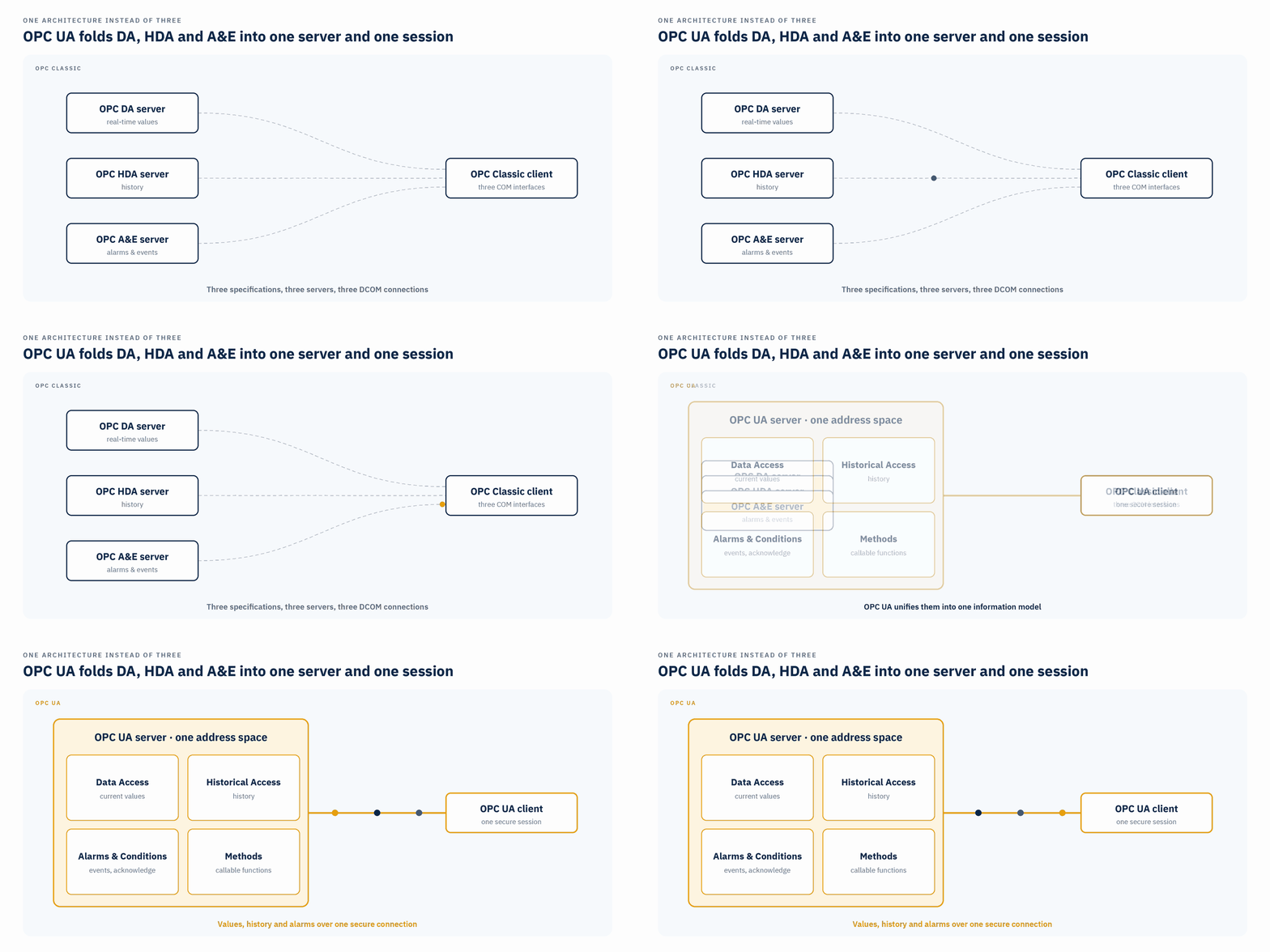
- Scope: OPC DA covers real-time values only. History (OPC HDA) and alarms (OPC A&E) need separate servers. OPC UA unifies all three, plus methods, in one address space.
- Security: OPC DA relies on Windows and DCOM settings. OPC UA adds application certificates, message signing, encryption and user authentication at the protocol level.
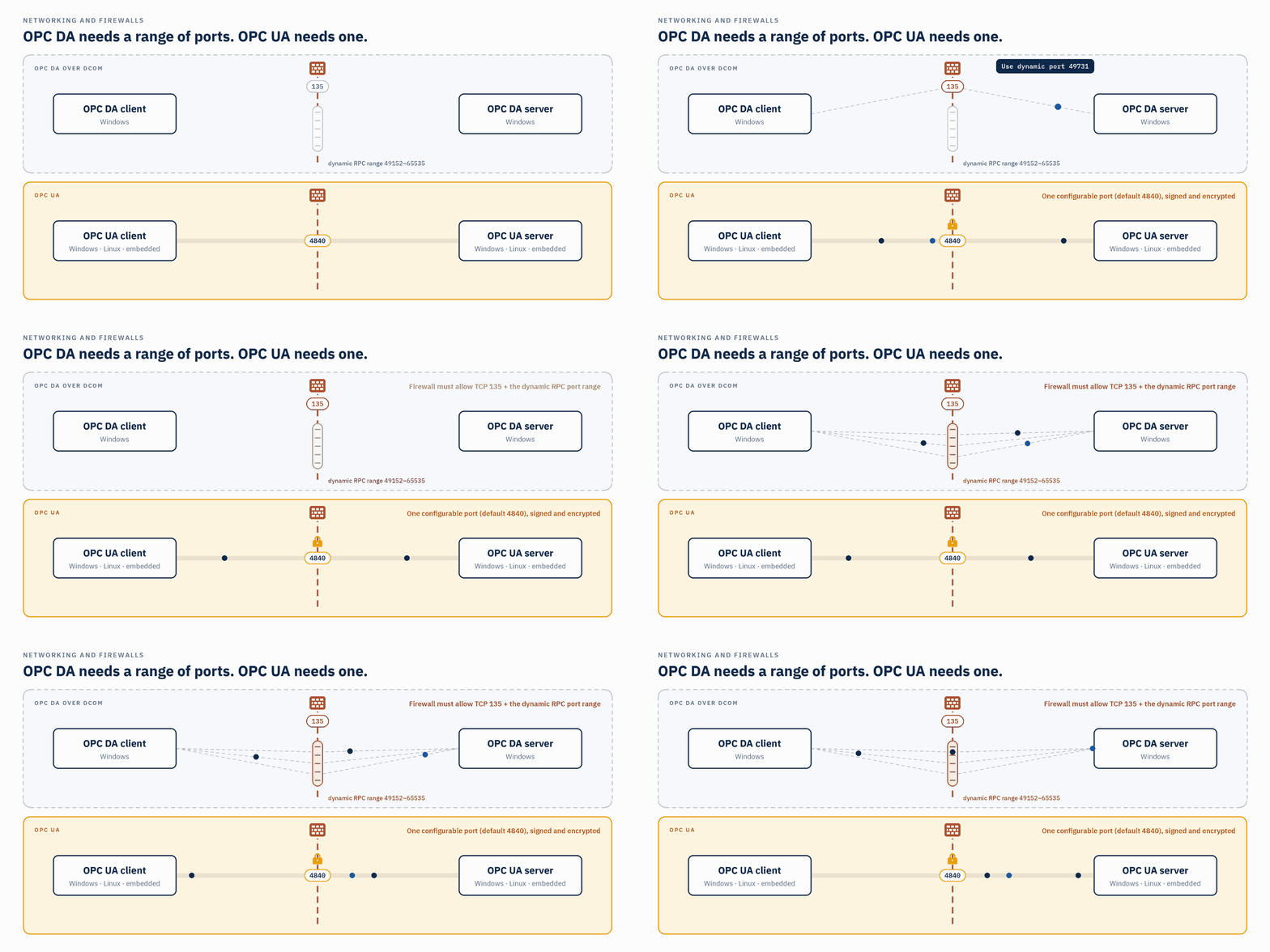
- Networking: DCOM needs TCP (Transmission Control Protocol) port 135 plus a dynamic port range through the firewall. OPC UA typically needs one port (4840 by default).
- Data: OPC DA delivers value, quality and timestamp. OPC UA also delivers meaning: types, units, ranges and relationships.
- Migration: You do not have to replace everything at once. Wrappers, proxies and tunneling let OPC DA and OPC UA coexist while you modernize.
What is OPC DA?
OPC DA, short for OPC Data Access, is the first and most widely deployed OPC specification. OPC originally stood for “OLE for Process Control” (OLE: Object Linking and Embedding) and today stands for Open Platform Communications. The OPC Foundation released Data Access 1.0 in 1996 to stop every HMI and SCADA vendor from writing its own driver for every PLC (Programmable Logic Controller) and DCS (Distributed Control System).
OPC DA defines how a client reads, writes and subscribes to current values from a server. Each item (tag) returns three things: a value, a quality flag and a timestamp. The specification went through versions 1.0a, 2.05a and 3.0, and it is built on Microsoft COM (Component Object Model) for local communication and DCOM (Distributed COM) for communication across a network.
OPC DA is one of a family of specifications now called OPC Classic:
- OPC DA (Data Access): real-time values
- OPC HDA (Historical Data Access): historical values
- OPC A&E (Alarms & Events): alarm and event notifications
Each is a separate interface, often implemented by a separate server. For a deeper background, see What is OPC?
What is OPC UA?
OPC UA (OPC Unified Architecture) is the OPC Foundation’s second-generation standard, released in 2008 and published as the international standard IEC 62541. It was designed to remove the COM/DCOM dependency and to bring the separate Classic specifications together into one framework.
OPC UA is a service-oriented architecture (SOA). Clients connect to a server through a secure channel and session, browse a structured address space, and read, write, subscribe, query history, receive alarms and call methods through one set of services. Since version 1.04, OPC UA also includes a publish/subscribe (PubSub) model that can run over UDP (User Datagram Protocol) or brokers such as MQTT (Message Queuing Telemetry Transport) and AMQP (Advanced Message Queuing Protocol). Learn more in What is OPC UA?
OPC DA vs OPC UA at a glance
| Criterion | OPC DA (OPC Classic) | OPC UA |
| Released | 1996 | 2008 (IEC 62541 since 2010) |
| Underlying technology | Microsoft COM/DCOM | Service-oriented, vendor-neutral protocol stack |
| Operating systems | Windows only | Windows, Linux, real-time and embedded OS, cloud |
| Scope | Real-time values only (history and alarms need HDA and A&E) | Real-time data, history, alarms and conditions, methods in one server |
| Data model | Browse tree of items: value, quality, timestamp, few optional properties | Object-oriented information model: types, units, ranges, references, methods |
| Security | Windows accounts and DCOM configuration | X.509 application certificates, signing, encryption, user authentication, auditing |
| Network ports | TCP 135 plus a dynamic RPC (Remote Procedure Call) port range | One configurable port (default 4840) |
| Transports | DCOM (Microsoft RPC) | UA TCP binary, HTTPS, WebSockets; PubSub over UDP, MQTT, AMQP |
| Firewalls and DMZ | Hard to traverse; often needs tunneling | Designed for routed networks; supports reverse connect from inside out |
| Typical deployment | Legacy SCADA, HMI and historians on a plant LAN | Controllers, edge devices, MES, ERP and cloud integration |
| Status | Legacy, still widely installed | Actively developed, with industry companion specifications |
Key differences between OPC DA and OPC UA
1. Architecture and platform
OPC DA is tied to Windows because COM/DCOM is a Windows technology. The server and every client that connects to it must run on Windows, and remote connections go through the DCOM runtime and Windows security settings.
OPC UA defines its own protocol stack, so it does not depend on any operating system. Many modern PLCs and DCS controllers now ship with an embedded OPC UA server, and the same client can connect from a Windows HMI, a Linux edge gateway or a cloud service.
2. One unified architecture instead of three specifications
With OPC Classic, a historian that needs live values, history and alarms may connect to three different servers through three different interfaces. OPC UA defines Data Access, Historical Access and Alarms & Conditions in a single address space, so when a server implements all three, one client opens one secure session to get all of it. That reduces the number of servers to install, license, patch and monitor.
3. Security
OPC DA has no security model of its own. Authentication and access control come from Windows accounts and DCOM permissions, and data usually travels unencrypted. Configuring DCOM securely is notoriously difficult, which is why many sites ended up with broad permissions just to make connections work.
OPC UA builds security into the protocol:
- Application authentication with X.509 certificates, so a client and server prove their identity before exchanging data
- Message security modes: None, Sign, or Sign and Encrypt
- User authentication: anonymous, username and password, user certificates or issued tokens
- Authorization and auditing on nodes and actions
OPC UA security still depends on configuration. Production systems should use Sign and Encrypt, manage certificate trust lists, and avoid the “None” security policy outside of testing.
The OPC DA side has also changed. Microsoft’s DCOM hardening update (KB5004442, addressing CVE-2021-26414) became mandatory on 14 March 2023. Since then, DCOM requires a minimum authentication level, and older OPC Classic clients that use lower levels can fail to connect. Read more in The security problem no one wants to talk about.
4. Networking and firewalls
DCOM first contacts the remote machine on TCP port 135 (the RPC endpoint mapper), which then assigns a dynamic port for the actual connection. On current Windows versions, that dynamic range defaults to 49152 to 65535. Allowing OPC DA through a firewall therefore means opening port 135 and a port range, or restricting the range in the registry. Crossing a DMZ (demilitarized zone) or NAT (Network Address Translation) boundary is even harder.
OPC UA uses a single, configurable TCP port, by default 4840. With reverse connect, a server inside the control network can open an outbound connection to a client, so no inbound firewall rule is needed on the OT (Operational Technology) side.
5. Data modeling
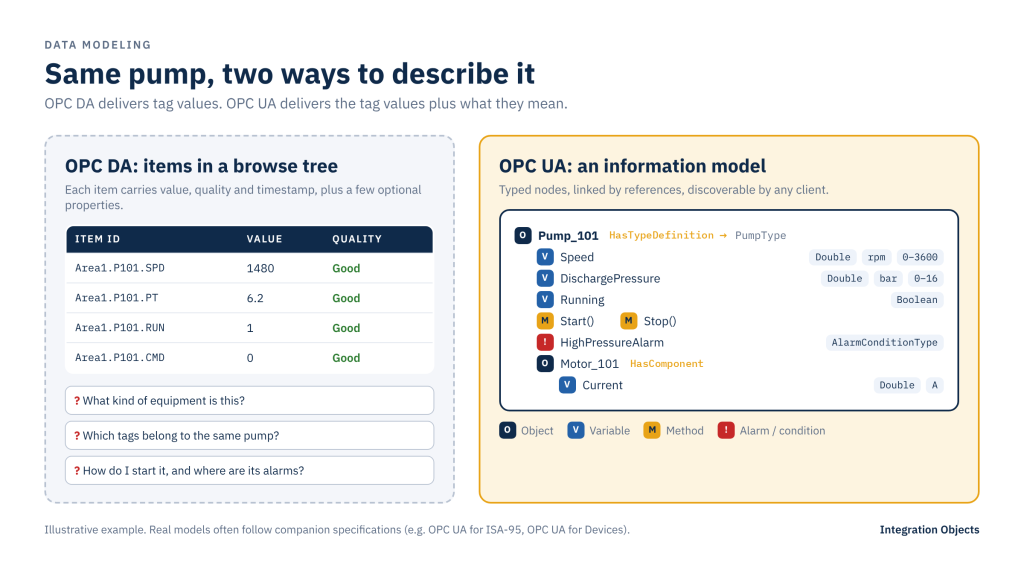
OPC DA gives you a browse tree of item IDs. You get the value, its quality and its timestamp, plus a few optional properties, but the protocol cannot tell a client that three tags belong to the same pump, what type of equipment that pump is, or how to start it.
OPC UA exposes an information model. Nodes are typed objects, variables and methods linked by references, with data types, engineering units and ranges attached. Industry groups publish companion specifications that standardize these models, such as OPC UA for ISA-95 or OPC UA for Devices, so a client can understand equipment from different vendors in the same way. That context is what makes OPC UA a natural fit for IIoT (Industrial Internet of Things) and IT/OT (Information Technology/Operational Technology) convergence projects.
6. Scalability: from the controller to the cloud
OPC DA was designed for a client and server on the same plant LAN. OPC UA scales in both directions: small enough to run inside a controller, and able to reach MES, ERP (Enterprise Resource Planning) and cloud platforms through HTTPS, WebSockets or PubSub over MQTT. This is why OPC UA appears in reference architectures for Industry 4.0 and the Unified Namespace (UNS).
7. Performance and reliability
Performance depends far more on implementation, update rates and network design than on the protocol name. On a single Windows machine, OPC DA over local COM is efficient, and many sites run it reliably for years. Over a network, however, DCOM can be slow to notice a broken connection and recovery often needs manual work.
OPC UA adds session keep-alives, subscription sequence numbers and a republish service, so a client can detect a dropped connection and request notifications it missed. Its binary encoding keeps overhead low on constrained networks.
8. Lifecycle and support
OPC Classic specifications are still maintained, but the OPC Foundation’s development effort is on OPC UA, which continues to add capabilities such as PubSub, field-level communications (OPC UA FX) and new companion specifications. Meanwhile, every Windows Server refresh is a chance for a working OPC DA connection to break because of DCOM changes. Windows Server 2016 extended support ends on 12 January 2027, which puts many OPC DA hosts on that refresh path.
Is OPC DA obsolete?
Not yet, and that is exactly why the comparison matters. A large installed base of OPC DA servers remains in service inside SCADA systems, historians and DCS workstations, and many of them work well. OPC DA can still be a sensible choice when:
- The client and server run on the same Windows machine, so DCOM never crosses the network
- A legacy controller or application only exposes OPC DA and is not due for replacement
- The system is isolated and stable, and a migration would add risk without adding value
The trouble starts when that data needs to leave the machine: to another network segment, through a firewall, to a non-Windows system or to the cloud. That is where OPC DA’s limits become operational costs.
OPC DA vs OPC UA: which should you use?
- New project or new equipment? Use OPC UA. It is the default for modern PLCs, DCS, MES and IIoT platforms.
- Existing OPC DA server, new OPC UA client? Keep the server and add a wrapper that exposes it as OPC UA.
- New OPC UA server, legacy OPC DA client? Keep the client and add a proxy that presents the OPC UA server as OPC DA.
- Remote OPC DA connections failing because of DCOM? Replace DCOM with an OPC tunnel now, and plan the OPC UA move later.
- Many protocols and sites to integrate? Consolidate OPC DA, OPC UA and other sources into one OPC UA endpoint on an integration platform.
How to move from OPC DA to OPC UA without replacing what works
The hardest part of migration is rarely the protocol. It is the installed base: OPC DA servers embedded in vendor systems, clients that cannot be upgraded, and production that cannot stop. A phased approach lets OPC DA and OPC UA coexist, so you modernize where it adds value and retire Classic components as assets reach end of life.
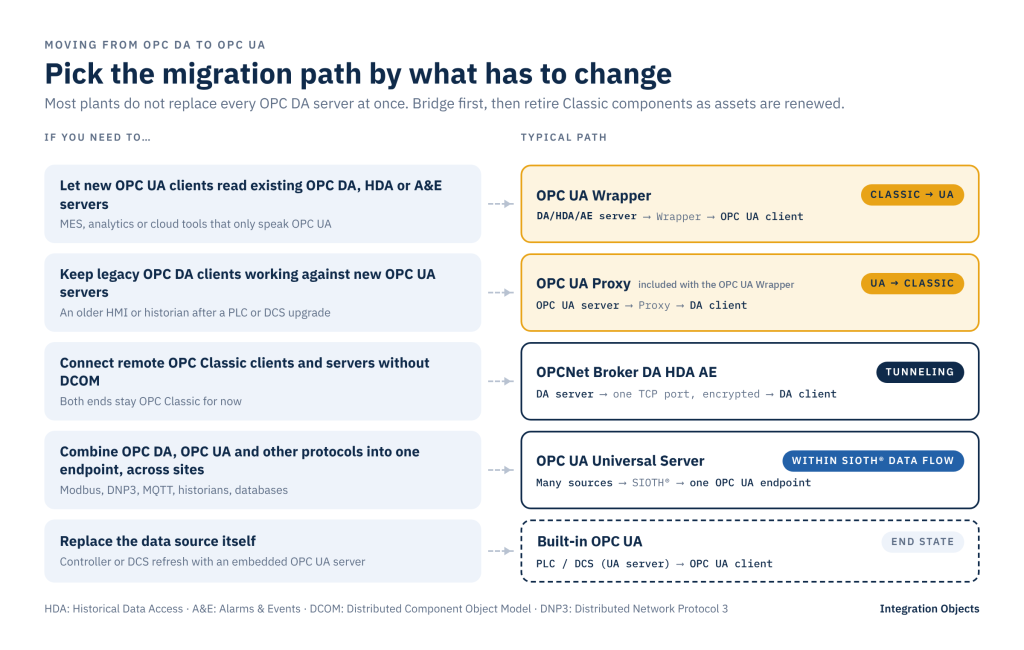
Integration Objects covers each of these paths with its OPC product line:
- OPC UA Wrapper exposes existing OPC DA, HDA and A&E servers to OPC UA clients, without changing the Classic server, its configuration or the devices behind it.
- OPC UA Proxy, included with the OPC UA Wrapper, works in the other direction, so legacy OPC Classic clients can read any OPC UA server without rewrites.
- OPC UA Bridge connects OPC Classic (DA, HDA, AE) and OPC UA in both directions, with encryption, authentication and DCOM elimination, for mixed systems that need traffic both ways.
- OPCNet Broker DA HDA AE replaces DCOM with DCOM-free, encrypted tunneling over a single TCP port, for sites that must keep OPC Classic for now.
- The OPC UA Universal Server, delivered as a configurable server within SIOTH® Data Flow on the SIOTH web platform, aggregates OPC DA, OPC UA and other industrial protocols into one secure OPC UA endpoint when the challenge goes beyond a single connection.
Download the Free Trial of OPC UA Wrapper Download the Free Trial of OPC UA Bridge Download the Free Trial of OPCNet Broker DA HDA AE
Before and after any change, you can validate connections with the free OPC DA Test Client and OPC UA Client.
Founded in 2002, Integration Objects is an OPC Foundation member and is ISO 9001 and ISO 27001 certified. Because the portfolio covers both directions (Classic to UA and UA to Classic), tunneling and multi-protocol integration, you can start with the bridge you need today and extend to SIOTH® when the second protocol, second site or IT integration arrives. For a step-by-step plan, read OPC UA Migration: The Complete Guide.
Planning a move from OPC DA to OPC UA? Our engineers can review your OPC Classic installed base and recommend the right mix of wrapping, proxying and tunneling for each system.
Frequently asked questions about OPC DA vs OPC UA
Is OPC UA backward compatible with OPC DA?
No. OPC UA and OPC DA use different technologies, so an OPC UA client cannot connect directly to an OPC DA server, and vice versa. A wrapper (Classic to UA) or proxy (UA to Classic) translates between them.
Is OPC DA still supported?
OPC DA remains widely installed and many vendors still support their OPC DA products, but new development at the OPC Foundation is focused on OPC UA. Windows DCOM hardening, enforced since March 2023, has also made remote OPC DA connections harder to maintain.
Does OPC DA work on Linux?
Not natively. OPC DA depends on Microsoft COM/DCOM, which is only available on Windows. To use OPC DA data on Linux, expose it through OPC UA with a wrapper or gateway running on Windows.
Which port does OPC UA use compared with OPC DA?
OPC UA uses one configurable TCP port, by default 4840. OPC DA over DCOM uses TCP port 135 for the RPC endpoint mapper plus a dynamically assigned port, by default in the 49152 to 65535 range on current Windows versions.
Is OPC UA more secure than OPC DA?
OPC UA includes certificate-based application authentication, message signing and encryption, and user authentication as part of the protocol. OPC DA relies on Windows and DCOM security. OPC UA is only secure when it is configured correctly, for example with the Sign and Encrypt mode and managed certificate trust lists.
Can OPC DA and OPC UA run side by side?
Yes. Most plants run both during a transition. Wrappers expose OPC DA servers to OPC UA clients, proxies let OPC DA clients read OPC UA servers, and tunneling removes DCOM from remote OPC Classic links in the meantime.
OPC Classic vs OPC UA: what about HDA and A&E?
OPC HDA (historical data) and OPC A&E (alarms and events) are the other OPC Classic specifications. OPC UA covers both through its Historical Access and Alarms & Conditions services, so an OPC UA server that implements both can replace all three Classic interfaces.
Related reading
- MQTT vs OPC UA: Which Protocol Should You Use?
- What is DCOM?
- What is OPC Tunneling? The Complete Guide to DCOM-Free OPC Communications
- OPC UA Migration Benefits