1. The real problem: old and new systems that cannot talk to each other
Most industrial facilities are not starting from a blank sheet. They have OPC Classic infrastructure – OPC DA servers feeding SCADA systems, OPC HDA servers archiving process history, OPC AE servers managing alarms – that has been running reliably for years, sometimes decades. Alongside it, they are being asked to connect cloud analytics platforms, modern MES systems, IIoT data pipelines, and AI-driven monitoring tools, all of which are built for OPC UA.
These two worlds do not speak the same language. OPC Classic uses Microsoft COM/DCOM technology, a Windows-only communication layer that modern OPC UA clients cannot connect to directly. OPC UA uses a purpose-built, platform-independent protocol stack with encrypted sessions and certificate-based authentication – which OPC Classic clients cannot connect to without translation.
The result is a connectivity gap that blocks every modernisation project that tries to cross it. Cloud data pipelines stall because they cannot pull from OPC Classic servers. Legacy SCADA systems cannot read from new OPC UA-native devices. The factory floor becomes two disconnected islands.
This is the problem the OPC UA Wrapper and OPC UA Proxy are designed to solve cleanly, without disrupting either side.
2. Why “replace everything” is not the answer
The theoretical solution to the connectivity gap is straightforward: replace all OPC Classic servers with native OPC UA servers, upgrade all OPC Classic clients to OPC UA clients, and the problem disappears. In practice, this approach fails on several counts.
- Cost. A plant with dozens of OPC Classic integrations (PLCs, DCSs, historians, HMIs, reporting tools) faces significant engineering, procurement, and testing expenditure for a full replacement programme. Capital budgets rarely accommodate this in a single cycle.
- Operational risk. Every system replacement carries the risk of a process interruption. In high-availability environments, continuous manufacturing, refinery operations, power generation, even a planned outage for migration carries significant cost. An unplanned interruption during migration is worse.
- Vendor constraints. Not every OPC Classic device or server has a supported upgrade path to OPC UA. Older PLCs and control systems may not have OPC UA firmware available at any price. Hardware replacement is a longer and more expensive proposition than a software migration.
- Time horizon. A full replacement programme that is safe to execute in a live production environment is measured in years, not months. The security risks and compliance pressures that are driving the migration need to be addressed on a shorter timeline than full replacement allows.
The bridging approach addresses all of these constraints. Security improvements and modern connectivity land immediately. The underlying systems stay exactly as they are. And the pathway to full OPC UA, replacing legacy servers one by one as they reach end-of-life, remains open and unobstructed.
3. The bidirectional bridge: Wrapper and Proxy explained
The OPC UA Wrapper product from Integration Objects contains two complementary components that together cover every direction of the OPC Classic ↔ OPC UA connectivity problem.
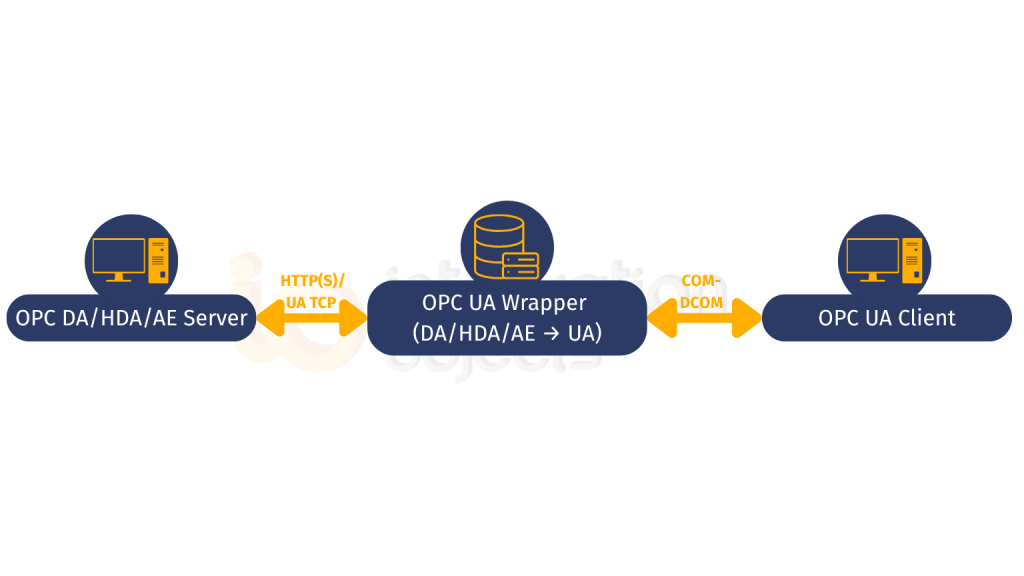
The OPC UA Wrapper component faces toward OPC Classic servers and OPC UA clients. It makes legacy OPC Classic servers accessible to modern OPC UA clients without changing the servers.
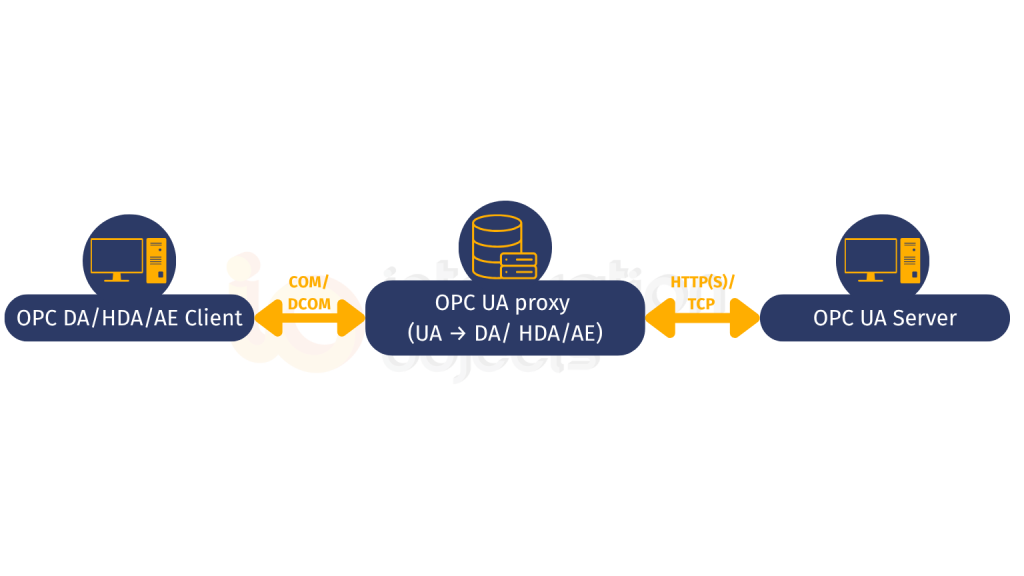
The OPC UA Proxy component faces toward OPC UA servers and OPC Classic clients. It makes modern OPC UA servers accessible to legacy OPC Classic client applications without changing those clients.
Both components are included in the same product and can be deployed simultaneously – creating a fully bidirectional bridge that handles the entire migration spectrum within a single architecture.
4. How the OPC UA Wrapper works
Scenario: You have existing OPC Classic DA, HDA, or AE servers. You want modern OPC UA clients – a cloud historian, an analytics platform, a new SCADA system – to read from them.
The OPC UA Wrapper connects to your existing OPC Classic servers using their standard DCOM interface, exactly as any OPC Classic client would. It reads the server’s address space, the tag hierarchy, historical data, alarm definitions, and re-exposes that data as a fully compliant OPC UA server on the other side.
OPC UA clients connect to the Wrapper’s OPC UA interface. They see a properly structured OPC UA address space, negotiate a secure session using X.509 certificates and AES encryption, and read or write data, without ever touching DCOM.
What stays unchanged on the OPC Classic side:
- The OPC Classic server and its configuration
- The PLC, DCS, or field device the server reads from
- The DCOM settings on the local machine
- Any existing OPC Classic clients that are already connected
What changes on the OPC UA side:
- New OPC UA clients can now connect with encryption (Sign & Encrypt mode), certificate authentication, and role-based access control
- The address space is automatically mapped from the OPC Classic tag structure into an OPC UA node hierarchy; no manual configuration required
- All connection events, reads, writes, and session activity are logged, supporting audit requirements for NIS2, NERC CIP, and FDA 21 CFR Part 11
Data coverage: all three OPC Classic specifications:
| OPC Classic spec | Data type | OPC UA equivalent exposed by Wrapper |
|---|---|---|
| OPC DA | Real-time process values (read/write) | OPC UA Data Access nodes – real-time read/write |
| OPC HDA | Time-stamped historical data | OPC UA Historical Access – raw and processed history |
| OPC AE | Alarms, events, acknowledgements | OPC UA Alarms and Conditions – full alarm lifecycle |
5. How the OPC UA Proxy works
Scenario: You have deployed new OPC UA servers, a modern PLC with native OPC UA, an OPC UA Universal Server, or a new SCADA platform. Your existing OPC Classic client applications: an older historian, a legacy reporting tool, a SCADA system that cannot yet be upgraded, still need to read from them.
The OPC UA Proxy connects to the OPC UA server using a standard OPC UA client session with full security, certificates, and encryption on that side. It then presents that OPC UA server’s data to the OPC Classic client world as if it were an OPC Classic server. The legacy client sees a familiar OPC Classic interface and connects via DCOM as it always has.
The legacy client requires no modification. It does not need to know that OPC UA is involved. The Proxy handles the protocol translation, data model mapping, and security negotiation completely transparently.
This is what makes a phased migration practical. New OPC UA servers can be deployed at whatever pace the programme allows, while legacy OPC Classic clients continue operating without disruption. The Proxy is removed from the architecture only when the last legacy client has been migrated or decommissioned, which may be years after the first OPC UA servers are in place.
6. When to use the Wrapper vs the Proxy: A decision guide
| Your situation | Component to use |
|---|---|
| You have OPC Classic servers and want OPC UA clients (cloud, MES, analytics) to read from them | OPC UA Wrapper |
| You have new OPC UA servers and want legacy OPC Classic clients (old SCADA, HMI, historian) to keep working | OPC UA Proxy |
| You are mid-migration: some servers upgraded, some not; some clients upgraded, some not | Both: Wrapper for legacy servers, Proxy for legacy clients |
| You want to immediately add encryption and authentication to OPC Classic data flows | OPC UA Wrapper : all new client connections use OPC UA security |
| You need to keep an older reporting tool running while the rest of the architecture moves to OPC UA | OPC UA Proxy: legacy tool connects via OPC Classic; it accesses OPC UA servers transparently |
In most brownfield environments, the answer is both, and running them simultaneously is fully supported within the same OPC UA Wrapper installation.
7. What this means for security and compliance
Beyond connectivity, the Wrapper/Proxy approach delivers an immediate and measurable improvement in security posture, one that maps directly to the compliance frameworks most relevant to industrial operators in 2026.
- NIS2 Directive (EU operators of essential services): NIS2, effective October 2024, requires encrypted communications and proper access controls for OT systems. Once the Wrapper is deployed, all new OPC UA client connections carry AES-256 encryption and require valid X.509 certificates. DCOM, with its complete absence of message encryption, is contained to the local machine boundary. This is a demonstrable, auditable improvement that supports NIS2 compliance progress without a full system replacement programme.
- NERC CIP (North American energy sector): DCOM’s dynamic port requirements have long made Electronic Security Perimeter compliance difficult for OT networks using OPC Classic. OPC UA operates on a single configurable port (default 4840). Replacing wide-area DCOM connections with Wrapper-mediated OPC UA connections significantly simplifies firewall rule management and makes Electronic Security Perimeter definitions cleaner and more auditable.
- IEC 62443 (global – industrial cybersecurity): IEC 62443 Zone and Conduit models require controlled, defined communication paths at zone boundaries. The Wrapper deployed at the boundary between an OPC Classic zone and an OPC UA-connected network creates exactly the kind of controlled, single-protocol conduit that IEC 62443 requires with OPC UA’s authentication and encryption providing the conduit security controls.
- FDA 21 CFR Part 11 / EU Annex 11 (pharmaceuticals): The Wrapper’s session-level audit logging records all connection events, data reads, and write operations. Combined with OPC UA user authentication, this provides the individual accountability and audit trail evidence that both regulatory frameworks require.
8. What customers say
“Excellent technical support.
Each IO employee I interfaced with was highly qualified, professional, and retained a ‘can-do’ attitude even during challenging moments.”
– IT-OT Integration Manager, Oil & Gas Industry
“Thanks to Integration Objects’ OPC UA Wrapper, we successfully secured the data flow from our control network, improving operational visibility and enabling faster decision-making across multiple plants.”
–- Operations Manager, Oil & Gas
“The solution’s ease of deployment allowed us to integrate diverse legacy systems without disruption. Integration Objects’ professional approach and ongoing support have been key to our digital transformation success.”
–Digital Transformation Lead, Automotive Manufacturing
9. How to get started
The OPC UA Wrapper is a plug-and-play Windows application with a GUI-based configuration tool. No scripting, no SDK knowledge, no changes to existing OPC Classic servers or clients required.
Step 1: Download and install the OPC UA Wrapper on a Windows host that can reach your OPC Classic servers (this can be the same machine as the OPC Classic server, or a separate host on the same network segment).
Step 2: Open the configuration tool and point it at your existing OPC Classic server(s). The Wrapper will browse the server’s address space and automatically map it to OPC UA nodes.
Step 3: Configure OPC UA security; select Sign & Encrypt mode and set up your server certificate. For production environments, configure X.509 certificate trust settings so only authorised OPC UA clients can connect.
Step 4: Connect your OPC UA clients (cloud platform, analytics tool, new SCADA) to the Wrapper’s OPC UA endpoint. Verify data is flowing correctly using the OPC UA Client for initial testing.
Step 5: For the Proxy direction. If you have legacy OPC Classic clients that need to access new OPC UA servers, configure the Proxy component within the same installation, pointing it at your OPC UA server(s).
Resources:
- OPC UA Wrapper product page: download and licensing
- How to configure OPC UA Wrapper address space: detailed configuration guide
- OPC UA Wrapper demo video: configuration walkthrough
- OPC UA Proxy demo video: Proxy configuration walkthrough
- OPC UA Migration: The Complete Guide: full migration strategy and roadmap
- Contact Integration Objects: discuss your specific environment
10. Frequently asked questions
Does the OPC UA Wrapper support all three OPC Classic specifications?
Yes. The Wrapper component supports OPC DA (real-time data), OPC HDA (historical data), and OPC AE (alarms and events). All three are exposed through OPC UA interfaces: OPC UA Data Access for real-time, OPC UA Historical Access for historical data, and OPC UA Alarms and Conditions for alarm management. This means OPC UA clients have a single, unified interface to all the data that was previously scattered across three OPC Classic specifications.
Can OPC Classic clients and OPC UA clients connect to the same data simultaneously?
Yes. When the Wrapper is deployed in front of an OPC Classic server, that server continues serving all its existing OPC Classic clients unchanged via DCOM as before. The Wrapper adds OPC UA access as an additional path to the same data. Both OPC Classic and OPC UA clients can connect and read simultaneously without conflict.
Is any downtime required to deploy the OPC UA Wrapper?
No process downtime is required. The OPC UA Wrapper installs alongside existing infrastructure without modifying or restarting OPC Classic servers. The only requirement is that the Wrapper service itself needs to start, which does not affect the OPC Classic servers it connects to. Existing OPC Classic client connections are not interrupted.
What OPC UA security configuration should I use with the Wrapper?
For all production deployments, use Security Mode: Sign & Encrypt with either the Aes256_Sha256_RsaPss or Aes128_Sha256_RsaOaep security policy. Configure X.509 certificate-based application authentication. Each OPC UA client that connects to the Wrapper must present a certificate that the Wrapper trusts. Do not use Security Mode: None in production environments. Refer to the OPC UA Security guide for a full explanation.
How does the Proxy handle security between OPC Classic clients and OPC UA servers?
The OPC UA Proxy connects to OPC UA servers using full OPC UA security - encrypted sessions, certificate authentication -on the OPC UA side. The OPC Classic client connects to the Proxy via DCOM on the legacy side. The Proxy manages the security boundary: the OPC UA server is protected by its own security configuration, while the legacy OPC Classic client continues using DCOM as it always has. This is a pragmatic architecture for the transition period; as legacy clients are retired, the DCOM side of the equation disappears entirely.
Related reading: OPC UA Migration cluster
- OPC UA Migration: The Complete Guide: full migration strategy, approaches and roadmap (pillar page)
- OPC Classic Security Risks and the OPC UA Wrapper: the security case for moving from OPC Classic
- How to Configure OPC UA Wrapper Address Space: step-by-step tag and node configuration
- OPC UA Wrapper: Cost Control and Compliance :the business case and ROI framing
- OPC UA Security: The Complete Guide: understanding OPC UA’s security model in depth
- What is OPC UA? : foundational guide to the protocol you are migrating to