Transferring files between an industrial control network and the outside world sounds straightforward until you consider what’s at stake. Industrial networks running SCADA, DCS, or other OT systems are deliberately isolated from corporate IT networks and the internet. That isolation is a core security principle. But operations still need files to move: historian exports, configuration backups, firmware updates, reports, log files, and more.
When that transfer is handled carelessly via USB drives, open FTP, uncontrolled VPN access, or direct network connections that bypass the DMZ, the security boundary that protects your control network is compromised. A single insecure file transfer path into an OT network is enough to introduce malware, enable unauthorized access, or become the entry point for a targeted attack on critical infrastructure.
This article explains the specific challenge of secure file transfer in industrial environments, what a purpose-built solution looks like, and how File Tunneller addresses the requirements that generic file transfer tools simply cannot meet.
Why secure file transfer in industrial networks is different
In enterprise IT, secure file transfer typically means encryption in transit and authentication. Those are necessary but in industrial environments, they are not sufficient on their own.
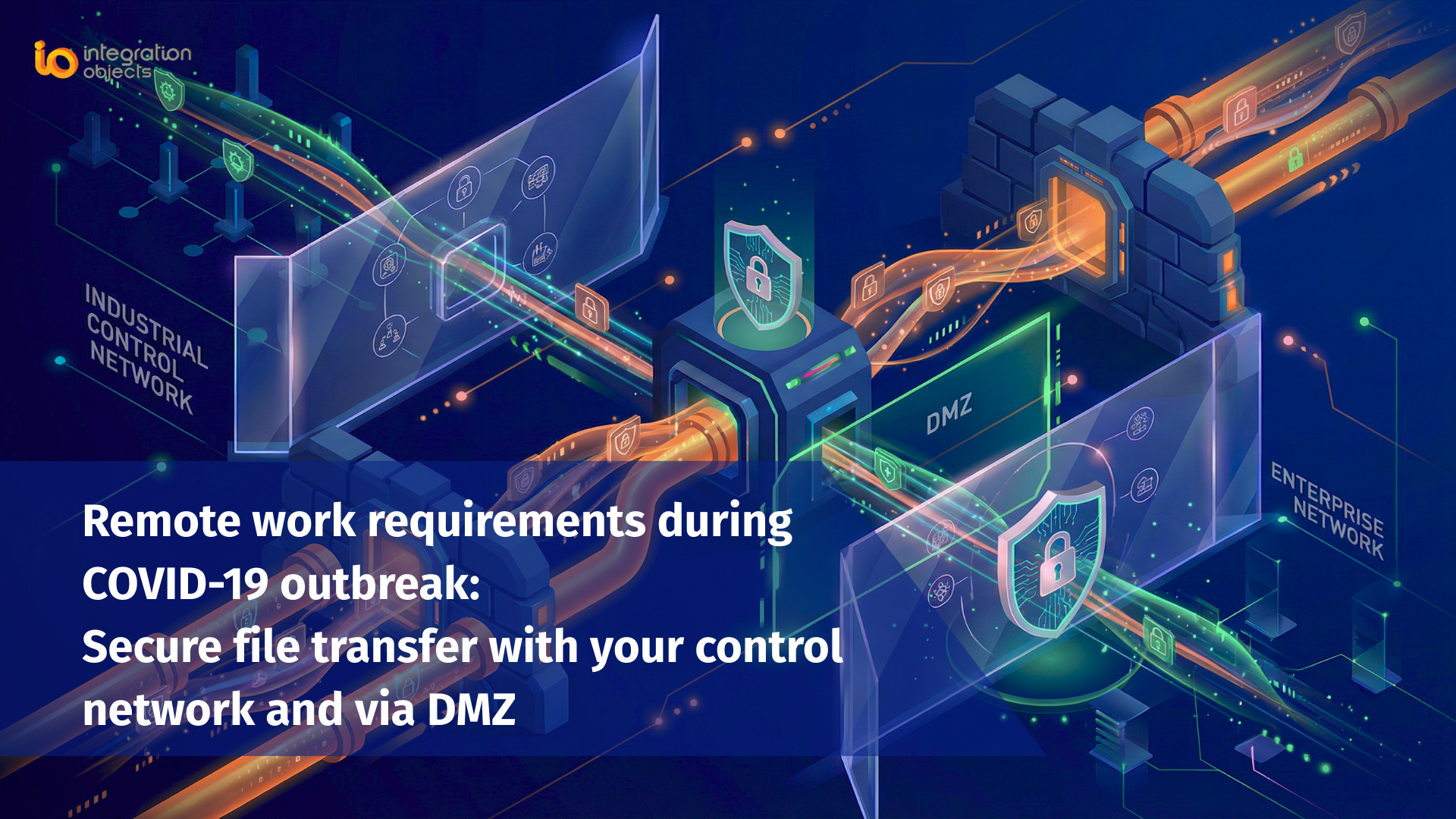
OT networks operate under a fundamentally different security model. The Purdue Model and IEC 62443 both define clear zone boundaries between the industrial control network (Level 2–3), the DMZ (Level 3.5), and the enterprise IT network (Level 4). The principle is strict: nothing should cross these boundaries without explicit, controlled authorization. Direct, persistent connections between the OT network and corporate or external networks are not permitted under this model.
This creates a specific set of requirements that file transfer in industrial environments must satisfy:
No persistent open connections into the OT network. A file transfer solution that requires an always-on inbound connection to the control network violates the zone separation principle and creates a permanent attack surface.
Firewall traversal through a single, defined port. Industrial firewalls are configured to allow only specific, known traffic. A solution that requires multiple ports, dynamic port negotiation, or protocol inspection exceptions is operationally difficult to approve and audit.
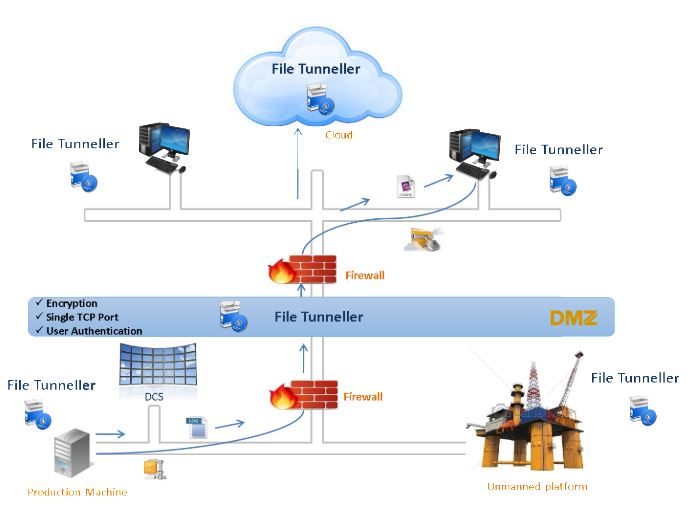
Support for DMZ-based architectures. Many industrial sites route all IT/OT data exchange through a DMZ. The file transfer solution must be able to operate correctly in a multi-hop topology: OT network → DMZ → IT network, without establishing a direct path between the two zones.
Encryption and authentication as baseline requirements. Files crossing from an OT network may contain sensitive process data, configuration files, or intellectual property. Encryption in transit is non-negotiable. Authentication ensures only authorized systems and users can initiate or receive transfers.
Resilience to network disruptions. OT networks – especially at remote sites connected via VSAT, WAN, or radio links – experience intermittent connectivity. A file transfer solution must handle connection drops gracefully, resuming or retrying transfers without data loss or corruption.
Scheduling and automation. Operations teams cannot be expected to manually initiate every file transfer. Scheduled, automated transfers triggered by time or event, are essential for historian exports, log archiving, and configuration backups.
Common approaches to industrial file transfer and their risks
Understanding why generic solutions fall short helps clarify what a purpose-built tool needs to do.
USB drives and removable media. Still the most common method at many industrial sites, and one of the highest-risk. USB drives are a well-documented malware vector the Stuxnet attack, which caused physical damage to industrial equipment, was introduced via USB. Removable media also has no audit trail, no encryption enforcement, and no way to prevent unauthorized copies of sensitive data.
Standard FTP / SFTP. FTP in any form is unsuitable for industrial networks it transmits credentials in plain text and requires multiple ports. SFTP is more secure but is still a general-purpose protocol that requires opening inbound SSH access to a host on or near the OT network. In most OT security policies, direct SSH access into the control network zone is not permitted.
VPN-based file transfer. VPN extends the corporate network across the tunnel, which is convenient but problematic from a zone-separation standpoint. A compromised endpoint on the VPN has lateral movement access into the OT network. For site-to-site file transfer between defined systems, VPN is architecturally over-privileged.
Manual copy via a jump host or bastion server. Operationally complex, requires human intervention for every transfer, creates bottlenecks, and is difficult to audit consistently. Suitable for ad-hoc access by engineers but not for automated, recurring transfers.
What industrial environments need is a solution designed specifically for this architecture: TCP-based, firewall-friendly, DMZ-aware, encrypted, authenticated, and capable of operating unattended on a schedule.
How File Tunneller addresses industrial file transfer security
File Tunneller is Integration Objects’ purpose-built solution for secure file transfer across industrial networks, DMZ environments, and wide-area connections. It was designed from the ground up for the specific constraints of OT environments not adapted from a general-purpose enterprise tool.
Single TCP port communication
All File Tunneller traffic moves through a single, user-configurable TCP port. This makes firewall rules simple, predictable, and auditable. Your firewall team approves one port. There are no dynamic port negotiations, no protocol inspection exceptions, and no need to open a broad range of ports that increases the attack surface.
DMZ-compatible architecture
File Tunneller supports multi-hop topologies, allowing it to be deployed in a proper DMZ architecture where no direct connection exists between the OT network and the IT network. The DMZ host acts as an intermediary files pass from the OT side to the DMZ host, and from the DMZ host to the IT side, without ever creating a routed path between the two zones.
Encryption and user authentication
All file transfers are encrypted in transit, ensuring confidentiality and integrity of the data regardless of the network path. User authentication ensures that only authorized systems and accounts can initiate or receive transfers preventing unauthorized access even if a network segment is compromised.
Resilience and automatic retry
File Tunneller maintains reliability over unreliable links including VSAT, WAN, VPN, and NAT environments. If a transfer is interrupted by a network disruption, it automatically retries and resumes, ensuring files arrive intact without requiring manual intervention.
Scheduled and automated transfers
Transfers can be scheduled on a daily, weekly, or monthly basis, or configured to run at a custom interval. This enables fully automated workflows – historian exports, configuration backups, log archiving – without requiring an operator to be present or manually trigger each transfer.
Multiple simultaneous connections
File Tunneller supports multiple concurrent client connections and simultaneous file transfers, making it suitable for multi-site deployments where several remote locations transfer files to a central historian or data repository.
Typical use cases for secure industrial file transfer
Historian data export to IT. Process historians on the OT network generate large volumes of time-series data that analytics teams, business intelligence tools, and ERP systems need. File Tunneller automates the scheduled export of historian files from the OT zone to the IT zone without creating a persistent data connection between them.
Firmware and software updates into the OT network. Applying updates to PLCs, RTUs, and SCADA servers requires getting files from the IT network into the OT network in a controlled, auditable way. File Tunneller provides a one-way or bidirectional transfer path that keeps the firewall configuration clean and the transfer logged.
Configuration backups from control devices. Regular backup of PLC and DCS configuration files to a secure off-network repository is a core OT resilience practice. File Tunneller can automate these backups on a schedule, ensuring current configuration files are always available for disaster recovery.
Log and alarm file archiving. Industrial systems generate operational logs and alarm histories that must be preserved for compliance, incident investigation, and performance analysis. Automating their transfer to long-term storage in the IT zone eliminates the manual effort and the security risk of removable media.
Remote site to central office data consolidation. For organizations operating multiple industrial sites – refineries, substations, offshore platforms, water treatment facilities – File Tunneller provides a consistent, secure mechanism for consolidating data from geographically distributed OT environments to a central location.
Frequently asked questions about secure file transfer in industrial networks
Can I use SFTP for file transfer in an industrial control network?
SFTP is more secure than FTP, but it is a general-purpose protocol that typically requires inbound SSH access into the host machine. In most OT security policies, opening direct SSH access into a control network zone is not permitted. Purpose-built industrial file transfer solutions operate over a single configurable TCP port and are designed to work within DMZ architectures without requiring direct inbound access to OT systems.
What is a DMZ in industrial network architecture?
In industrial cybersecurity (based on standards like IEC 62443 and the Purdue Model), a DMZ (Demilitarized Zone) is a buffer network segment between the OT (operational technology) zone and the IT (information technology) zone. It prevents direct connections between the two zones while allowing controlled, monitored data exchange. Any file transfer solution for industrial environments should be able to operate correctly in a DMZ topology routing files through the DMZ intermediary rather than creating a direct path between OT and IT.
Why is using a USB drive to transfer files in an OT environment a security risk?
USB drives are a primary malware vector for industrial environments. They bypass network security controls entirely and can introduce malicious software directly onto OT systems. They also provide no encryption, no audit trail, and no access control. High-profile attacks on industrial infrastructure, including Stuxnet, were delivered via removable media. Most modern OT cybersecurity policies and standards (including IEC 62443) recommend eliminating removable media use in control network zones.
How does File Tunneller handle network disruptions during a transfer?
File Tunneller is designed for resilience over unreliable links including VSAT, WAN, and NAT environments. If a connection is interrupted mid-transfer, it automatically retries and resumes the transfer from where it left off, ensuring files are delivered intact without requiring manual re-initiation.
Does File Tunneller support automated, scheduled transfers?
Yes. File Tunneller supports configurable scheduling daily, weekly, monthly, or at a custom interval. This enables fully automated workflows such as historian exports, configuration backups, and log archiving, without requiring operator involvement for each transfer.
What is the difference between File Tunneller and a standard FTP solution for industrial use?
Standard FTP transmits credentials in plain text and requires multiple ports both disqualifying for industrial OT environments. File Tunneller uses a single configurable TCP port, encrypts all traffic, authenticates users, supports DMZ architectures, and handles network disruptions automatically. It is designed for the specific security and operational constraints of industrial networks, not adapted from a general enterprise tool.