Securing OPC data transfers is one of the most pressing challenges in modern industrial automation. OPC Classic was built for closed, trusted networks – not the IT/OT-integrated, cloud-connected environments most industrial organizations now operate. As industrial data pipelines stretch from PLCs and SCADA systems through enterprise IT networks and into cloud platforms, every hop in that journey is a potential security exposure.
This guide explains why OPC data transfer security matters, what the specific risks are for OPC Classic and OPC UA environments, how a DCOM-free, encrypted architecture looks in practice, and how to implement it using proven industrial tools.
Why securing OPC data transfers is critical
OPC data carries real-time process values, alarm states, historical trends, and equipment telemetry – the operational intelligence that drives production decisions, safety responses, and predictive maintenance. When that data is intercepted, tampered with, or disrupted, the consequences go beyond a data breach: they can affect physical processes, compromise safety systems, and cause operational downtime.
Three structural factors make OPC data transfer security particularly challenging:
OPC Classic’s dependence on DCOM. OPC DA, HDA, and AE use Microsoft’s DCOM protocol for remote communication. DCOM was designed for closed, trusted Windows networks and has no native encryption. OPC traffic transmitted over raw DCOM can be intercepted by anyone with network access between the client and server machines. Beyond confidentiality, DCOM’s authentication model is weak by modern standards – a vulnerability Microsoft acknowledged with the CVE-2021-26414 hardening update in 2023.
Expanding network perimeters. Industrial networks that were once fully air-gapped now connect to corporate IT networks, remote monitoring platforms, and cloud services for analytics, reporting, and AI-driven insights. Each new connection is a potential ingress point. Data flowing from a SCADA historian to an Azure or AWS environment crosses multiple network boundaries, each of which must be secured without disrupting data continuity.
Lack of encryption by default. Neither OPC Classic nor older OPC UA deployments always enforce encryption in practice. Many industrial installations run with OPC UA’s security mode set to “None” for simplicity, and OPC Classic has no encryption capability at all at the protocol level. This means sensitive process data often travels in plain text across networks that are less isolated than operators assume.
OPC Classic vs OPC UA: security differences
Understanding the security gap between OPC Classic and OPC UA is essential before choosing a secure transfer approach.
OPC Classic (DA, HDA, AE) has no built-in transport security. All remote communication goes through DCOM, which relies on Windows authentication and does not encrypt the data payload. Securing OPC Classic traffic requires either layering a tunneling solution on top (which provides encryption and replaces DCOM) or migrating to OPC UA entirely. Firewall traversal is complex – DCOM uses port 135 plus dynamic high ports, making it very difficult to lock down properly.
OPC UA was designed with security as a core requirement. It uses its own TCP-based transport stack, supports TLS encryption, X.509 certificate-based authentication, and has three defined security modes: None, Sign, and Sign & Encrypt. When correctly configured with Sign & Encrypt mode, OPC UA provides strong end-to-end security without requiring any additional tunneling layer. However, “correctly configured” is the key phrase, many real-world OPC UA deployments run in None or Sign-only mode, leaving data unencrypted in transit.
|
|
OPC Classic (DA/HDA/AE) | OPC UA |
|
Native encryption |
None |
TLS (when configured) |
|
Authentication |
Windows/DCOM |
X.509 certificates |
|
Firewall-friendly |
No (dynamic ports) |
Yes (single TCP port) |
|
Security mode options |
None |
None / Sign / Sign & Encrypt |
|
Requires tunneling for security? |
Yes |
No (if properly configured) |
What a secure OPC data transfer architecture looks like
A robust secure OPC data transfer architecture addresses three layers: transport security (how data moves), access control (who can read or write what), and reliability (what happens when the connection drops).
The reference architecture: OPC Easy Archiver + OPCNet Broker®
Integration Objects’ OPC Easy Archiver and OPCNet Broker® together form a complete, DCOM-free, encrypted OPC data pipeline. Here is how each component contributes and how they work together.
OPCNet Broker®: secure DCOM-free transport layer
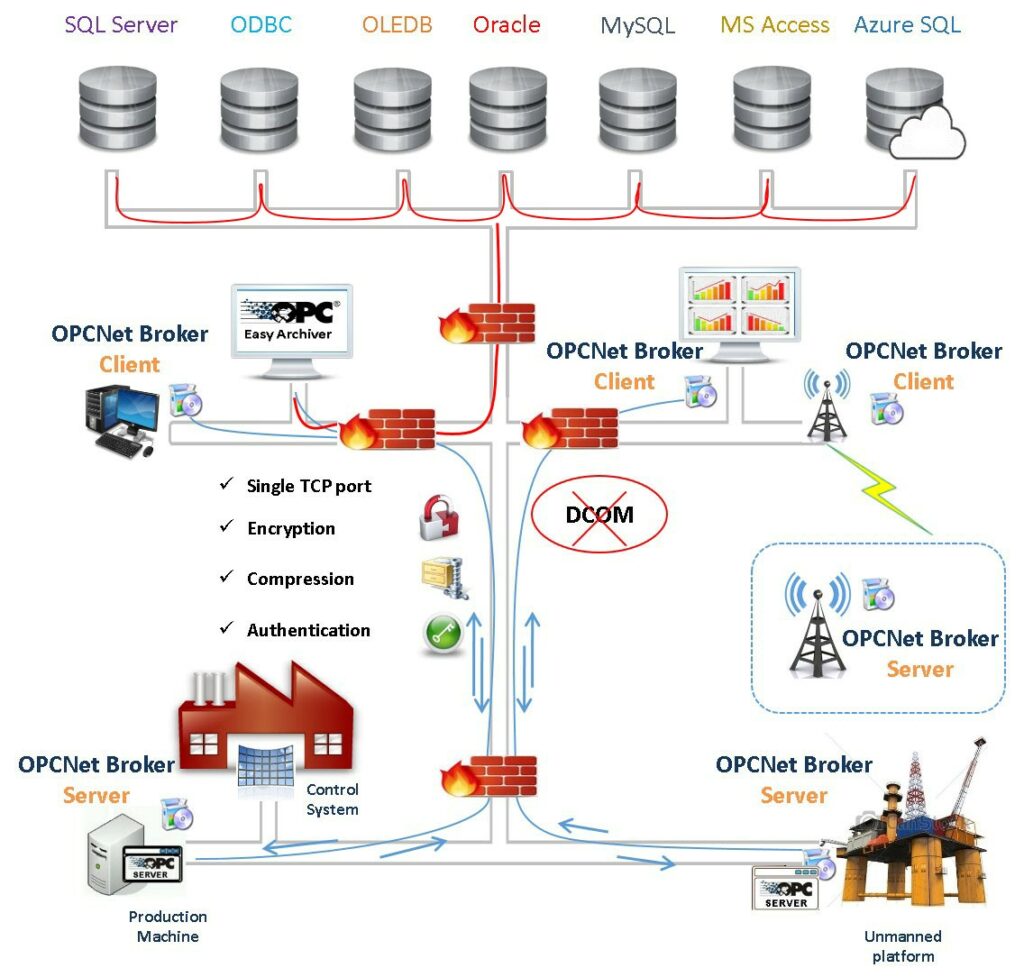
OPCNet Broker® sits on the OPC server side and replaces DCOM entirely as the communication transport. OPC clients connect to OPCNet Broker® locally (avoiding remote DCOM), and OPCNet Broker® handles all remote communication using a single, configurable TCP port – making firewall rules simple and predictable.
Security features OPCNet Broker® provides at the transport layer:
- Data encryption for all OPC traffic in transit, without requiring certificates
- User authentication – only authorized users and applications can connect
- IP whitelisting – connections are restricted to defined trusted hosts
- Tag-level access control – each user’s browse, read, and write permissions can be defined down to individual OPC tags
- OPC server redundancy management – automatic failover if the primary server becomes unavailable
OPC Easy Archiver: secure data collection and forwarding
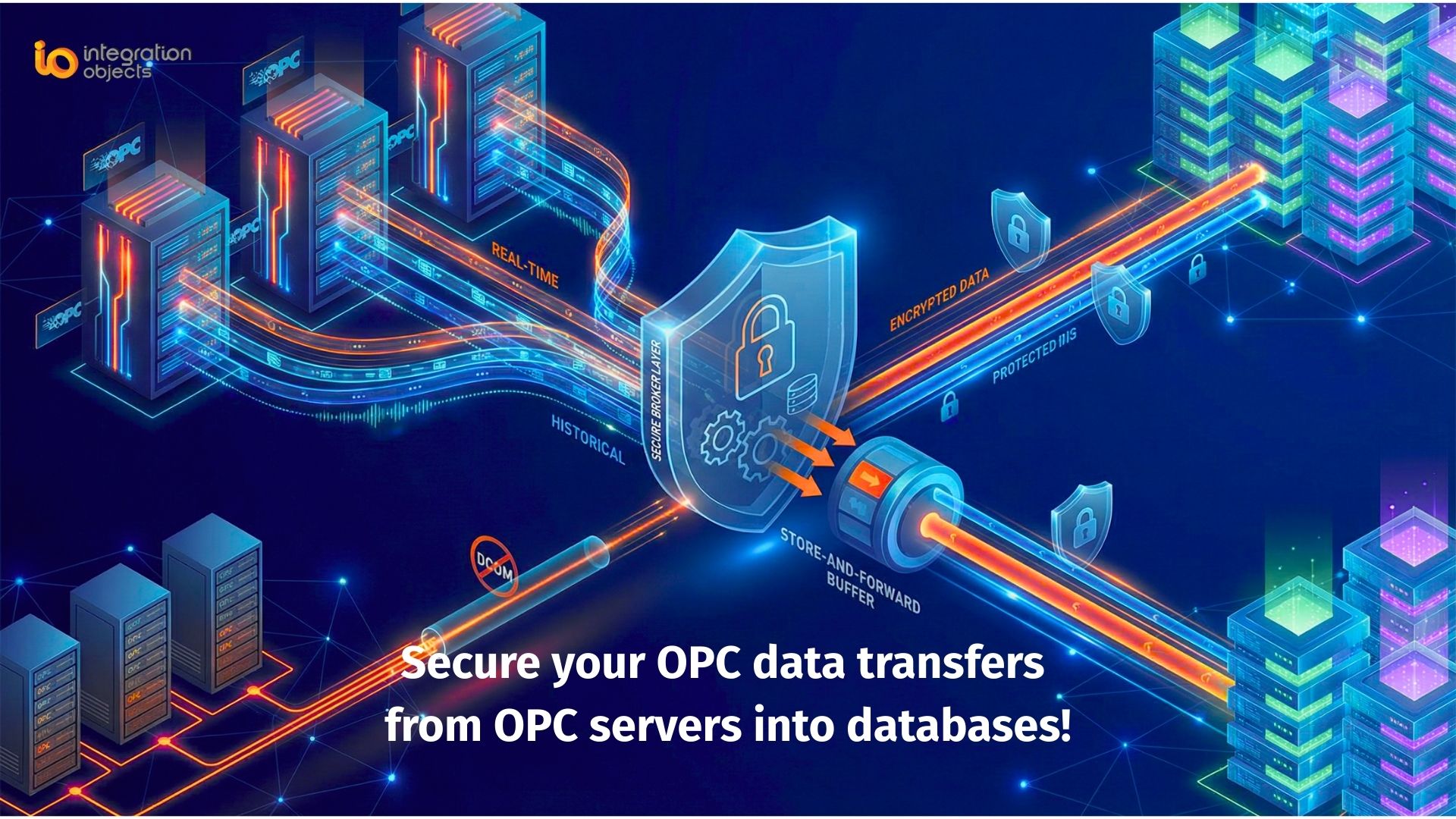
OPC Easy Archiver connects to the OPC server (via OPCNet Broker® for OPC Classic, or directly for OPC UA) and collects real-time tag values, alarms, and events. It then forwards that data to its configured destination – a local SQL database, a CSV file store, an on-premise MQTT broker, or a cloud MQTT endpoint such as Azure IoT Hub – with store-and-forward buffering to handle network interruptions without data loss.
Key security and reliability capabilities OPC Easy Archiver provides:
- Encrypted forwarding to MQTT brokers (supporting MQTT 3.1 and 3.1.1 with TLS)
- Store-and-forward: data is buffered locally if the destination is unreachable and retransmitted in order once connectivity is restored
- Automatic reconnection to both OPC source and data destination
- Support for multiple simultaneous destinations – local database, remote MQTT, and cloud endpoints concurrently
- Publishing to Azure IoT Hub via MQTT, enabling integration with Azure Stream Analytics, Power BI, and AI/ML pipelines
How they work together
The combined architecture creates a complete, auditable data path from the OPC server all the way to cloud or enterprise destinations:
OPC Server → OPCNet Broker® (encrypted, authenticated, DCOM-free) → OPC Easy Archiver (collect, buffer, forward) → MQTT Broker / SQL Database / Azure IoT Hub
No DCOM touches the network. No unencrypted OPC traffic leaves the local machine. The firewall sees only one TCP port. Data gaps from network interruptions are automatically backfilled. And every access point – from which users can connect, to which tags they can read – is controlled and auditable.
Deployment scenarios
On-premise: secure OPC data transfer to local historian or SQL database
The simplest deployment uses OPCNet Broker® to secure and DCOM-free the connection between an OPC client (such as OPC Easy Archiver) and the OPC Classic server, with OPC Easy Archiver writing collected data to a local SQL Server, MySQL, or PostgreSQL database. This is suitable for plants that want to secure their existing OPC data collection without any cloud connectivity.
Multi-site: consolidating OPC data from remote locations
For organizations with multiple industrial sites – offshore platforms, remote substations, distributed manufacturing facilities – OPC Easy Archiver at each site collects and buffers local OPC data, forwarding it over WAN or VSAT links to a central MQTT broker. OPCNet Broker® at each site ensures the OPC connection itself is secure and DCOM-free. Store-and-forward ensures no data is lost during link outages.
Hybrid cloud: OPC data to Azure IoT Hub or cloud MQTT
OPC Easy Archiver can publish OPC tag data directly to Azure IoT Hub via MQTT, enabling cloud-based analytics, dashboards, and AI models to consume real-time industrial data. The OPC-to-cloud path is fully encrypted: OPCNet Broker® secures the OPC layer, and TLS secures the MQTT transport to the cloud endpoint. No raw OPC traffic ever leaves the plant network.
Best practices for securing OPC data transfers
Eliminate DCOM from remote OPC Classic connections. DCOM is the single largest OPC security liability. Any remote OPC Classic communication that can be replaced with an encrypted TCP tunnel should be. Use OPCNet Broker® or migrate to OPC UA via an OPC UA Wrapper.
Never run OPC UA in “None” security mode in production. The convenience of disabling OPC UA security for testing or commissioning often becomes permanent. Enforce Sign & Encrypt mode on all production OPC UA servers and audit your existing deployments to identify any running without encryption.
Use tag-level access control, not just connection-level. Controlling which applications can connect to an OPC server is necessary but not sufficient. Defining per-user read, write, and browse permissions at the tag level, as OPCNet Broker® enables, prevents an authorized user from accessing data or issuing commands beyond their operational role.
Implement store-and-forward for all remote data paths. Any OPC data collection that crosses a WAN, VSAT, or unreliable network link should use store-and-forward buffering. Without it, network interruptions create data gaps in historians and MQTT streams that can corrupt analytics and compliance records.
Segment OPC traffic through a DMZ. Do not create direct routed paths between the OT network and corporate IT or cloud endpoints. Route OPC data through a DMZ intermediary, where it can be inspected, logged, and filtered before crossing zone boundaries.
Audit and monitor OPC data access. Know which clients are connecting to your OPC servers, which tags they are reading, and when. OPCNet Broker® provides connection and access logging that supports both security monitoring and compliance requirements.
For more Information:
- OPC Easy Archiver: https://integrationobjects.com/opc-products/opc-data-archiving/opc-easy-archiver/
- OPCNet Broker: https://integrationobjects.com/opc-products/opc-tunneling/opcnet-broker-da-hda-ae/
Frequently asked questions about secure OPC data transfer
Does OPC UA encryption make OPCNet Broker® unnecessary?
For pure OPC UA environments with properly configured Sign & Encrypt security mode, OPC UA's native security stack is sufficient and OPCNet Broker® is not required for the OPC layer. However, OPCNet Broker® remains valuable in mixed environments where OPC Classic servers still exist, and it adds tag-level access control and redundancy management capabilities beyond what OPC UA security alone provides.
What is store-and-forward and why does it matter for OPC data security?
Store-and-forward is a mechanism that buffers data locally when the destination (a MQTT broker, database, or cloud endpoint) is temporarily unreachable, then retransmits it in correct order once connectivity is restored. Without it, network interruptions create permanent gaps in your historian or cloud data stream. OPC Easy Archiver includes store-and-forward, ensuring that even in environments with unreliable WAN links, no process data is permanently lost
Can OPC data be sent securely to the cloud?
Yes. OPC Easy Archiver can publish OPC tag data to cloud MQTT endpoints, including Azure IoT Hub, using MQTT over TLS. Combined with OPCNet Broker® securing the OPC Classic layer, this creates a fully encrypted path from the OPC server all the way to cloud analytics and AI platforms - with no unencrypted OPC traffic leaving the plant network.
What is tag-level security in OPC and why is it important?
Tag-level security means defining access permissions - browse, read, and write - for individual OPC tags on a per-user basis, rather than simply controlling who can connect to the server. Without tag-level security, any authorized user can read all tags and potentially write to any writable tag. OPCNet Broker® enables tag-level access control as an add-on, ensuring that operators, engineers, and external systems can only access the specific data they are authorized to see or modify.
What happens to OPC data if the network connection drops mid-transfer?
Without store-and-forward, data generated during a connection outage is lost. OPC Easy Archiver buffers data locally during outages - whether the OPC source or the destination is unreachable - and resumes delivery once the connection is restored. This ensures data continuity across unreliable network links without any manual intervention.
Is it safe to run OPC UA with security mode set to "None"?
No, not in a production environment. Security mode None means all OPC UA traffic is transmitted unencrypted and unauthenticated. While it is sometimes used during commissioning and testing for simplicity, leaving it in place in production exposes all process data to interception by anyone on the network. Production OPC UA deployments should use Sign & Encrypt security mode, enforced at the OPC UA server configuration level.