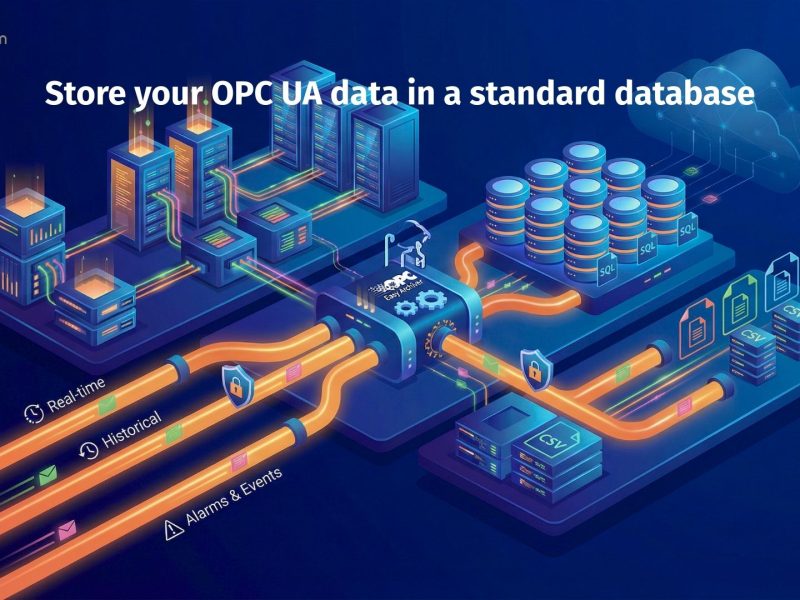
OPC AE (Alarms & Events) is a key standard in industrial automation for monitoring and managing alarms and event data. Unlike OPC DA, which deals with process values, OPC AE focuses specifically on:
-
Alarms: Immediate notifications of abnormal conditions, such as equipment failures, safety hazards, or threshold violations.
-
Events: Changes in system states, operational updates, or non-critical notifications that require tracking over time.
Collecting, archiving, and analyzing OPC AE alarms and events is essential for safe, efficient, and compliant industrial operations.
With OPC Easy Archiver, you can collect OPC AE data from multiple servers in real-time and store it reliably in SQL databases, providing a foundation for historical analysis, compliance reporting, and operational insight.
Why Store OPC AE Alarms & Events in SQL Databases?
Storing OPC AE data in a SQL database provides multiple operational and business benefits:
1. Historical Analysis & Trends
SQL databases allow you to maintain a complete historical record of alarms and events. This enables engineers and operators to identify recurring issues, understand trends, and make data-driven decisions to optimize operations.
2. Regulatory Compliance & Audit Trails
Many industries require audit-ready alarm logs to meet safety and compliance regulations. SQL storage provides secure, timestamped records that satisfy regulatory requirements and simplify reporting.
3. Root Cause Investigation
When incidents occur, having a centralized, searchable SQL database of OPC AE alarms allows teams to quickly trace the origin of problems, identify contributing factors, and prevent future occurrences.
4. Centralized Monitoring & Integration
SQL databases make it easy to integrate OPC AE data with other systems, dashboards, or BI tools. This centralized access ensures your team can monitor alarms and events across multiple servers or sites from a single interface.
5. Reliability & Data Security
By archiving OPC AE data in a structured SQL database, you ensure data integrity and prevent loss even during network interruptions. Solutions like OPC Easy Archiver also support store-and-forward mechanisms for guaranteed delivery.
OPC Easy Archiver: Simplifying OPC Data Management
OPC Easy Archiver is designed to handle all your OPC data efficiently:
-
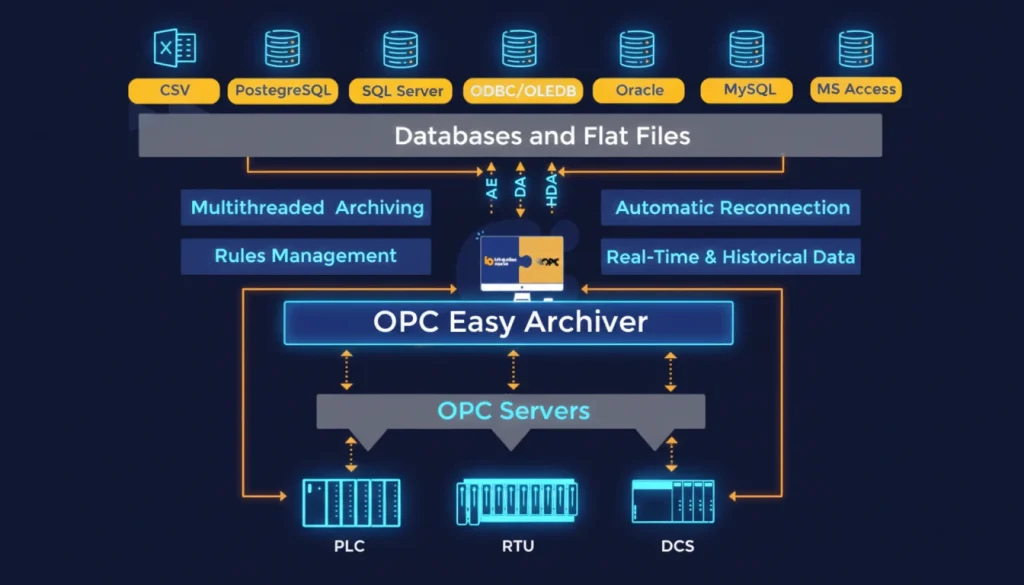
Multi-server support: Collect alarms and events from OPC AE, DA, and HDA servers simultaneously.
-
Flexible storage options: Log data into MS SQL, Oracle, MySQL, PostgreSQL, ODBC, or CSV files.
-
Cloud-ready: Transfer OPC AE data to platforms like Azure SQL for centralized access and analysis.
-
Reliable delivery: Store-and-forward ensures no data loss, even during network issues.
-
Centralized monitoring: Access real-time and historical data in a single interface for operational insight and reporting.
Video Demo
Watch our tutorial to see OPC Easy Archiver in action:
-
Connect to OPC AE servers
-
Configure alarm and event collection
-
Store alarms in SQL databases securely
-
Select vendor-specific attributes
-
Enable store-and-forward for reliable delivery
This hands-on demo illustrates how OPC Easy Archiver makes OPC AE alarms and events logging easy, secure, and scalable.
Conclusion
Storing OPC AE alarms and events in SQL databases is more than just data logging – it’s a strategic step toward operational excellence, compliance, and actionable insights.
With OPC Easy Archiver, you can:
-
Collect data from multiple OPC AE servers in real-time
-
Ensure secure, reliable, and centralized storage
-
Enable historical analysis, trend monitoring, and audit-ready reporting
-
Integrate with cloud platforms and dashboards for enterprise-wide monitoring
Transform raw alarm and event data into valuable insights with OPC Easy Archiver – your trusted solution for OPC AE data management.
Further Reading & Resources
Expand your knowledge on industrial data archiving and learn how to manage alarms, events, and historical data across OPC servers:
- Learn strategies to centralize your operational data efficiently, reducing costs and improving visibility: Centralize your Plant Data with Minimum Costs
- Discover how to archive OPC UA data in SQL databases or CSV files for centralized monitoring and analysis: How to Store OPC UA Data in a Standard Database (SQL & CSV Logging)
- Step-by-step guide on collecting and archiving historical OPC HDA data: How to Collect OPC HDA Data and Store It in MS SQL Server Using OPC Easy Archiverv
- Deep dive into historical OPC data collection, complementing your OPC data archiving strategy: OPC HDA Explained: How to Collect and Archive Historical OPC Data
Practical OPC Easy Archiver Resources
For hands-on learning and implementation:
- Watch detailed video tutorials on configuring OPC Easy Archiver for OPC DA, HDA, and AE data collection: OPC Easy Archiver Videos Demo Hub
- Step-by-step reference for installing, configuring, and using OPC Easy Archiver to store alarms, events, and historical data: OPC Easy Archiver User Guide
These resources provide practical guidance for implementing OPC Easy Archiver in real-world scenarios, helping you maximize reliability, compliance, and operational insight.