If you run OPC Classic applications in your industrial environment, Microsoft’s DCOM server security hardening update is one of the most operationally significant Windows changes in recent years. Since March 2023, it has been permanently enforced with no way to roll it back – meaning any OPC Classic setup that hasn’t adapted is either broken or running with a workaround that introduces its own risk.
This article explains what the DCOM server security change is, which OPC systems it affects, how to check if your environment is impacted, and what your options are for maintaining secure, uninterrupted OPC communication.
What is DCOM server security and why does it matter for OPC?
DCOM (Distributed Component Object Model) is the Microsoft protocol that OPC Classic – including OPC DA, OPC HDA, and OPC AE – has relied on since its inception for remote communication between OPC clients and servers. DCOM handles the remote procedure calls that allow an OPC client on one machine to read data from an OPC server on another.
The problem is that DCOM was designed in the 1990s for closed, trusted networks. As industrial environments became more interconnected, and as attackers became more sophisticated, DCOM’s security model became a liability. Microsoft identified a specific vulnerability, CVE-2021-26414, which allowed attackers to bypass DCOM server security authentication, potentially gaining unauthorized access to systems communicating over DCOM.
The fix was a mandatory hardening update that raises the minimum authentication level required for all DCOM connections. This is the right security decision, but it breaks any OPC Classic client application that doesn’t support the new Packet Level Integrity requirement.
The Microsoft DCOM hardening rollout timeline
Microsoft released the DCOM server security hardening update (KB5004442) in stages to give organizations time to adapt:
|
Update release |
Behavior change |
| June 8, 2021 |
Hardening changes disabled by default but with the ability to enable them using a registry key. |
| June 14, 2022 | Hardening changes enabled by default but with the ability to disable them using a registry key. |
| March 14, 2023 | Hardening changes enabled by default with no ability to disable them. By this point, you must resolve any compatibility issues with the hardening changes and applications in your environment. |
As of March 2023, there is no registry key, no group policy, and no workaround that disables this enforcement. Every Windows machine that receives standard updates is now running with DCOM hardening active.
Which OPC systems are affected?
The DCOM server security hardening update affects the OPC client side of any remote OPC Classic connection. Specifically, when the Windows update is applied to the machine running the OPC server, any OPC client connecting to it remotely must support Packet Level Integrity – the elevated authentication level Microsoft now requires.
You are affected if:
- You use OPC Classic (DA, HDA, or AE) for remote communications between machines
- Your OPC client application was built before the hardening requirement and has not been updated to support Packet Level Integrity
- Your OPC client is part of a larger OT system such as a SCADA or DCS platform where the vendor has not yet released a compatible update, or where updating the software in a production environment is not immediately feasible
You are not affected if:
- All your OPC Classic communication is local (client and server on the same machine)
- You have already migrated to OPC UA, which uses its own security model independent of DCOM
- Your OPC client vendor has already released an update that supports Packet Level Integrity and you have deployed it
How to check if your environment is impacted
Before choosing a remediation path, confirm whether your systems are affected:
Step 1: Check the Windows update status on your OPC server machine. Open Windows Update history and confirm whether KB5004442 or any cumulative update from June 2022 onwards has been applied. On fully patched Windows systems from March 2023 onwards, hardening is active.
Step 2: Test your OPC client connections. After confirming the server machine is patched, attempt to connect your OPC client to the remote OPC server. If the connection fails with an access denied or authentication error that wasn’t present before, the hardening update is likely the cause.
Step 3: Check the Windows Event Log. On both the client and server machines, look in the System event log for DCOM-related errors (Event ID 10036 is commonly associated with DCOM authentication failures following this update).
Step 4: Consult your OPC client vendor. Ask your OPC client software vendor whether their product supports DCOM Packet Level Integrity. If they have released an updated version, that is the first remediation option to evaluate.
What happens if you don’t address DCOM server security hardening?
Ignoring the DCOM server security update is not a safe option, for two reasons.
First, the registry workaround that previously allowed organizations to disable hardening has been removed since March 2023. There is no longer a supported way to revert to pre-hardening DCOM behavior on a patched Windows system.
Second, CVE-2021-26414 is a real vulnerability. Running with weakened DCOM authentication in an environment that is increasingly connected as IT/OT integration accelerates creates a genuine attack surface. Industrial systems that communicate via DCOM across network boundaries are particularly exposed.
The correct response is to either update your OPC client software to support Packet Level Integrity, or to eliminate DCOM from your OPC communication architecture entirely.
Solutions for maintaining OPC communication after DCOM hardening
There are two proven approaches for keeping OPC Classic communication working securely after the Microsoft DCOM server security update without waiting for your OPC client vendor to release an update.
-
Option 1: OPC tunneling with OPCNet Broker®
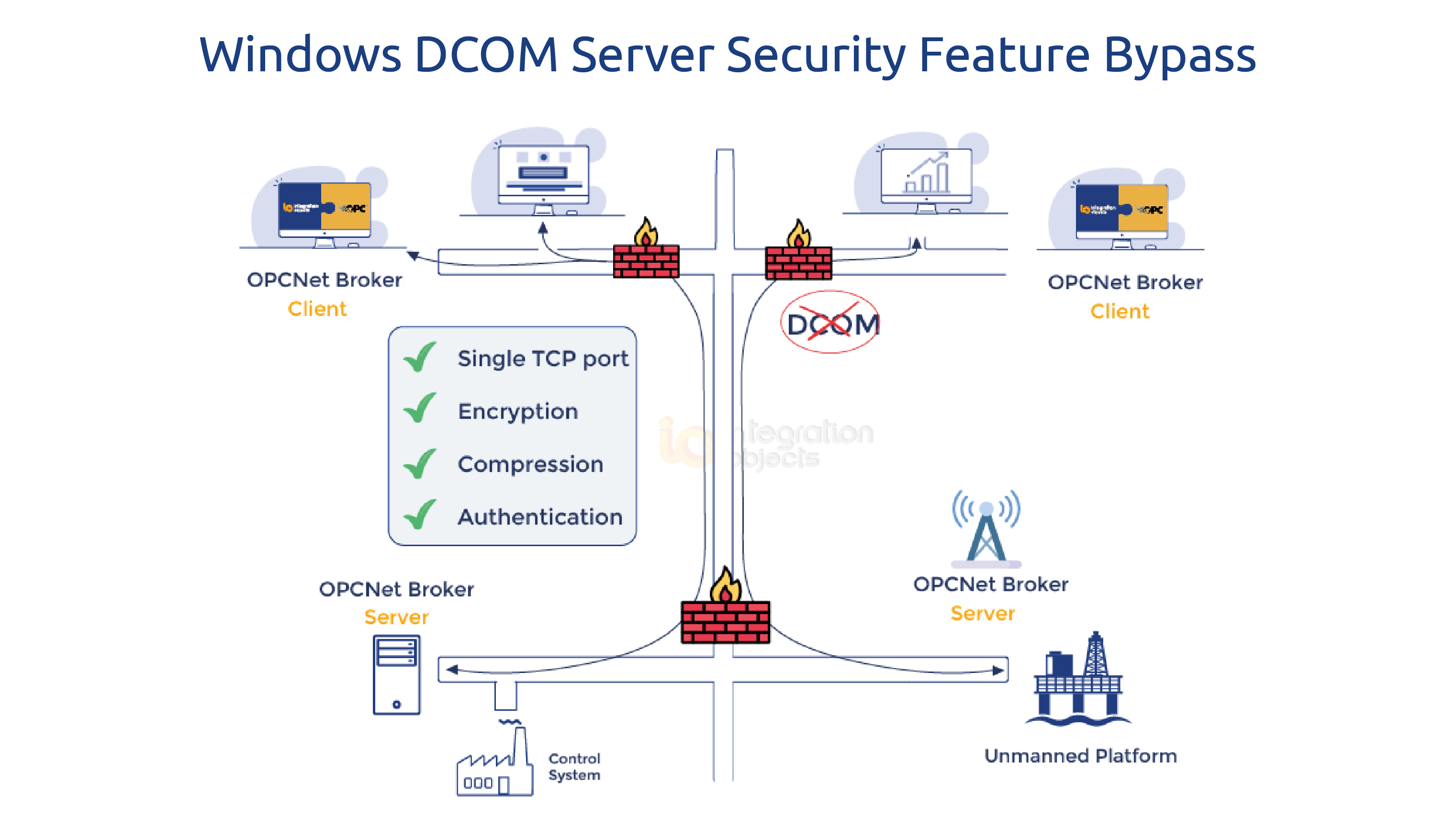
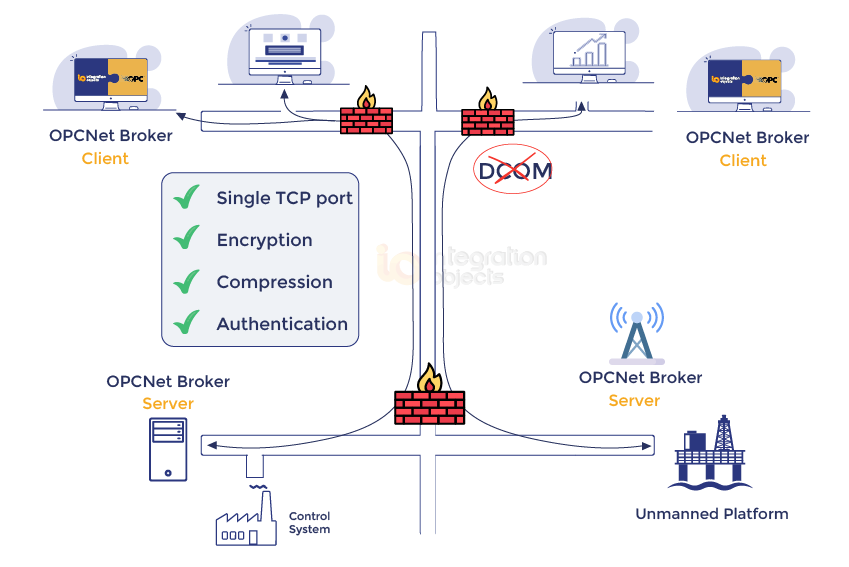
OPCNet Broker® replaces DCOM entirely as the transport layer for OPC Classic communication. Instead of relying on DCOM for remote connections, it encapsulates OPC DA, HDA, and AE traffic inside a standard TCP connection using a single configurable port.
This approach works regardless of your OPC client’s DCOM support level, because the OPC client connects locally to OPCNet Broker® on the same machine – a local connection that is not subject to the remote DCOM hardening requirement. OPCNet Broker® then handles the secure remote communication to the OPC server side.
The result: you can apply the Windows DCOM server security update fully, keep your existing OPC client and server software at their current versions, and maintain continuous, secure OPC communication without touching the client application code.
Additional security capabilities OPCNet Broker® provides beyond DCOM elimination: data encryption without certificates, user authentication, IP whitelisting, and tag-level access control down to browse, read, and write permissions per user.
This solution will allow you to implement the Windows DCOM update while using your existing software versions for the OPC Server and Client components.Download OPCNet Broker
-
Option 2: Migration to OPC UA with OPC UA Wrapper
Many OPC client vendors have responded to the DCOM problem by adding OPC UA support to their products. OPC UA uses its own transport and security model – TLS encryption, X.509 certificates, and application-level authentication – which is entirely independent of DCOM. Migrating your client-server communication to OPC UA sidesteps the DCOM server security issue permanently.
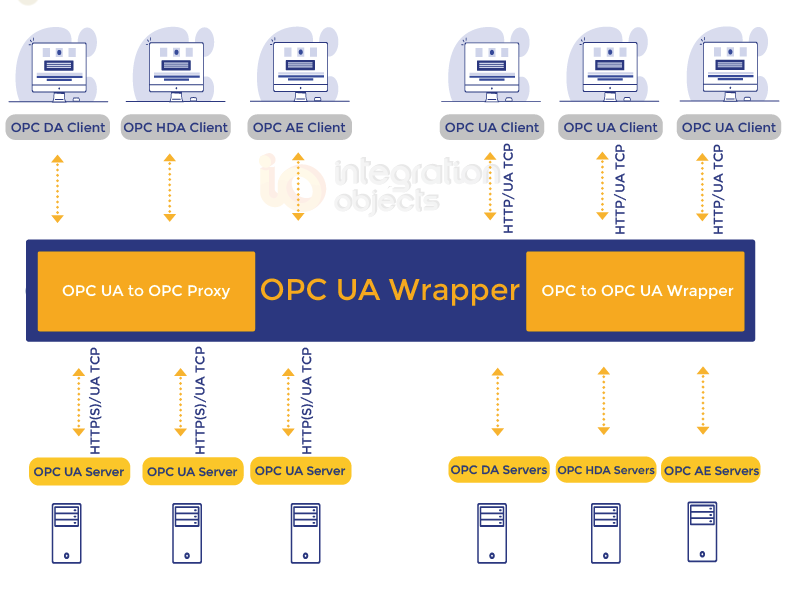
The challenge is that most existing OPC server installations still run OPC Classic only. The OPC UA Wrapper bridges this gap: it sits alongside your existing OPC Classic server and exposes its data as a standards-compliant OPC UA server. Your OPC UA-capable client connects to the wrapper over OPC UA, while the wrapper communicates locally with the Classic server — keeping DCOM off the network entirely.
This is the right path if you are planning a broader migration toward OPC UA and want to move your security architecture forward at the same time.
Frequently asked questions about DCOM server security and OPC
No. Since March 14, 2023, the DCOM server security hardening has been permanently enforced on all patched Windows systems. The registry key that previously allowed organizations to disable it has been removed. There is no supported way to revert to pre-hardening DCOM behavior. OPC Classic uses DCOM for all remote communications. The hardening update requires a higher authentication level - Packet Level Integrity - than many older OPC client applications were built to support. When the OPC server machine is patched and the OPC client doesn't meet the new requirement, the remote connection is rejected. Not necessarily. The update affects the OPC client's ability to connect to a patched OPC server machine. Solutions like OPCNet Broker® work at the transport layer and allow you to keep your existing OPC server software unchanged while eliminating DCOM from remote communications. OPCNet Broker® keeps your entire OPC Classic architecture intact and replaces only the DCOM transport with a secure TCP tunnel - no software changes on the client or server are needed. The OPC UA Wrapper converts your OPC Classic server into an OPC UA server, which is the better choice if your OPC client already supports OPC UA or if you are planning a migration toward OPC UA. No. OPC UA was designed with security built in from the ground up. It uses its own transport stack - typically TCP with TLS encryption - and does not use DCOM at all. Migrating from OPC Classic to OPC UA permanently eliminates DCOM-related vulnerabilities. Event ID 10036 in the System event log on the OPC server machine is commonly generated when a DCOM connection is rejected due to insufficient authentication level following the KB5004442 hardening update. Is the DCOM hardening update still reversible?
Why does the DCOM update break OPC Classic connections?
Do I need to update my OPC server software to fix this?
What is the difference between OPCNet Broker® and the OPC UA Wrapper for this use case?
Does OPC UA have the same DCOM security problems?
What event ID should I look for in Windows logs to diagnose a DCOM authentication failure?